














 En
En
 42 min read
Introduction: Why Conversion Tracking Needs a New Approach
Digital advertising has entered a new phase. Browser privacy restrictions, changing tracking technologies, consent requirements, and the growing use of ad blockers have made it increasingly difficult for advertisers to connect advertising clicks with completed purchases.
For ecommerce businesses, this creates a serious challenge. Your Google Ads campaigns may generate sales, but the conversion reports in your advertising account may not capture every transaction that advertising helped produce. When conversion data becomes incomplete, marketers may struggle to evaluate campaign performance, calculate return on ad spend, allocate budgets, and make confident optimization decisions.
This is where Google Ads Enhanced Conversions becomes important.
Enhanced Conversions is a measurement feature that supplements conventional conversion tracking with eligible first-party customer information, such as email addresses and phone numbers. This information is normalized and hashed using a one-way cryptographic algorithm before being sent for matching, subject to applicable settings and consent requirements. Google can use eligible matching results to improve conversion attribution and measurement.
For advertisers, the potential benefit is straightforward: more complete conversion measurement can provide a stronger foundation for understanding advertising performance and optimizing campaigns.
However, Enhanced Conversions is not a universal solution to every tracking problem. It does not eliminate the need for a correctly configured conversion tag, guarantee that every missing purchase will be recovered, or override customer consent choices. Its effectiveness depends on implementation quality, available first-party data, accurate conversion events, and compliance with applicable policies.
This guide explains how Enhanced Conversions works, why it matters in a privacy-focused advertising environment, and how to configure it for an ecommerce website. It also covers Google Tag Manager implementation, Shopify considerations, testing procedures, common mistakes, and the metrics advertisers should monitor after deployment.
Whether you manage a growing independent store or a mature ecommerce business, understanding Enhanced Conversions can help you build a more reliable measurement system without abandoning established conversion tracking.

1. Why Traditional Conversion Tracking Is Becoming Less Reliable
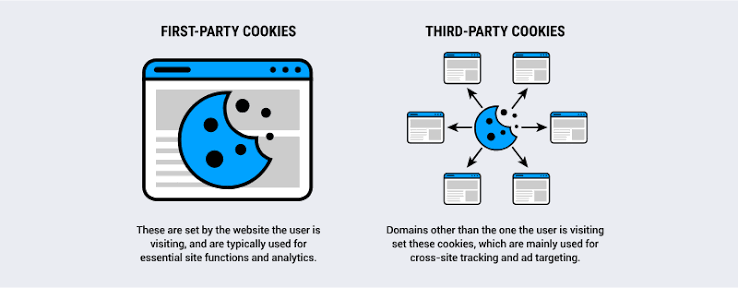
Traditional Google Ads conversion tracking often relies on advertising identifiers, browser storage, click information, conversion tags, and related signals to associate a completed action with an advertising interaction.
When someone clicks an ad, visits a website, and purchases a product, a properly configured tracking system attempts to connect the purchase to the earlier advertising interaction.
In a straightforward scenario, this process can work well. However, modern browsing environments introduce complications.
1.1 Browser Privacy Restrictions
Browsers increasingly restrict how websites store and access certain identifiers. Some browsers limit tracking technologies by default, while others provide users with controls over tracking and site data.
These restrictions can reduce the availability of signals used for advertising measurement.
For example, a customer might click a Google ad on one device, browse a store, and return later to complete a purchase. If the information needed to connect those interactions is unavailable, the advertising platform may have difficulty attributing the sale correctly.
The customer still purchased the product. The merchant still received the revenue. The limitation lies in measurement, not necessarily in the underlying transaction.
1.2 Cross-Device Shopping
Consumers frequently move between devices during the buying process.
A customer might discover a product on a smartphone, research it on a laptop, and complete the purchase on a tablet. Alternatively, they may click an advertisement on a work computer and buy the product later from a personal device.
Without sufficient matching information and eligible attribution signals, conventional tracking may not reliably connect these separate interactions.
Enhanced Conversions can provide additional first-party matching signals when customers supply eligible information during a conversion.
However, it does not guarantee cross-device attribution in every situation. Matching depends on whether the information is available, valid, eligible for processing, and successfully matched.
1.3 Consent Choices and Privacy Controls
Customers increasingly expect businesses to explain how their information is collected and used.
Consent management platforms, privacy settings, and regional data-protection requirements can affect which tracking signals a website is permitted to collect or transmit.
These choices must be respected.
Enhanced Conversions does not grant permission to collect customer information that a business is otherwise prohibited from collecting. Hashing personal information also does not automatically make its processing exempt from privacy laws.
Advertisers must design their measurement systems around the permissions and legal requirements applicable to their customers.
1.4 The Difference Between Missing Data and Missing Sales
One of the most important distinctions in advertising analysis is the difference between an actual business outcome and a reported conversion.
Suppose an online store records 500 completed orders in its ecommerce backend, but Google Ads reports 430 purchases attributed to advertising.
That difference does not automatically mean that 70 purchases were lost because of browser restrictions.
Some orders may have come from organic search, direct traffic, email marketing, repeat customers, or other channels. Some may have been affected by attribution windows, consent choices, tag failures, or differences in reporting definitions.
Enhanced Conversions may help recover some eligible attribution signals, but it cannot establish that every difference between backend orders and advertising conversions represents missing ad-driven sales.
The first step is to diagnose the measurement system rather than assume that every discrepancy has the same cause.
2. What Are Google Ads Enhanced Conversions?
Enhanced Conversions is a feature that supplements existing conversion tracking with eligible first-party customer data.
For example, when a customer completes a purchase, an ecommerce store may have access to the email address associated with that transaction. If the implementation, settings, and applicable permissions allow it, the website can provide that information to Google’s measurement systems.
Google normalizes and hashes eligible customer information using SHA-256 before using it for matching. Matching results can help associate a conversion with an eligible Google advertising interaction.
The feature is designed to improve measurement accuracy while supporting Google’s privacy-related requirements.
2.1 How Enhanced Conversions Works
The general process involves five stages.
Stage 1: A customer completes a conversion.
A customer purchases a product, submits a lead form, or completes another supported conversion action.
Stage 2: The website has eligible first-party information.
Depending on the conversion and implementation, this information may include an email address, phone number, or supported address fields.
Stage 3: The tracking implementation processes the information.
The Google tag, Google Tag Manager, or another supported integration provides the eligible information to the appropriate Google measurement destination.
Stage 4: The information is hashed and used for matching.
The data is normalized and hashed as required. Google can use eligible matching signals to help associate the conversion with an advertising interaction.
Stage 5: Conversion measurement may improve.
When matching succeeds, the advertising platform may be able to attribute conversions that would otherwise have been more difficult to measure.
This process supplements the existing conversion measurement system rather than replacing the underlying purchase event.
2.2 What Does SHA-256 Hashing Mean?
SHA-256 is a cryptographic hashing algorithm that transforms an input into a fixed-length output.
For example, an email address can be normalized and processed into a hash that looks like an apparently random string of characters.
A hash is not the same as encryption. Encryption is designed to be reversible with the appropriate key, while a properly implemented cryptographic hash is designed to be computationally infeasible to reverse directly.
However, hashing does not automatically anonymize personal information in every legal or technical context. Information derived from an email address may still be treated as personal data when it can be associated with an individual or used for matching.
That is why privacy notices, consent controls, data minimization, and platform policies remain important.
Advertisers should not assume that hashing alone makes customer data collection compliant.
2.3 Enhanced Conversions Does Not Replace Standard Conversion Tracking
Enhanced Conversions is designed to work alongside an existing conversion measurement setup.
You still need to define the conversion action, install the appropriate tracking implementation, and ensure that the conversion event fires correctly.
For ecommerce businesses, the purchase event should reflect a completed order rather than a product-page visit, an add-to-cart action, or the beginning of checkout.
If the underlying purchase event is missing or fires incorrectly, Enhanced Conversions cannot reliably repair that fundamental problem.
Think of it as an additional matching layer, not a replacement for a well-designed measurement system.
3. Enhanced Conversions for Web vs. Enhanced Conversions for Leads
Enhanced Conversions has historically been discussed in two contexts: online purchases and lead generation.
The distinction matters because the conversion events and data flows are different.
Google has also unified the configuration of Enhanced Conversions for web and leads. As of April 2026, Google Ads accepts eligible user-provided data through website tags, Data Manager, and API connections under a unified setting. Existing implementations may have been migrated to the updated configuration. Exact interface labels can vary as the platform evolves.
3.1 Enhanced Conversions for Web
Enhanced Conversions for web is designed for website conversions, including ecommerce purchases and other supported online actions.
Typical examples include:
- Completed product purchases.
- Paid subscriptions.
- Online bookings.
- Completed registrations.
- Other supported website conversion events.
For an ecommerce business, purchase tracking is usually the highest priority because it connects advertising measurement to actual sales.
The website must still transmit the correct purchase event, transaction information, and eligible customer data.
3.2 Enhanced Conversions for Leads
Lead generation businesses often collect information through a website form and later determine whether the lead becomes a qualified prospect or customer.
Enhanced Conversions for leads supports measurement workflows in which eligible first-party information can help connect offline or later-stage conversions to earlier advertising interactions.
For example, a customer might submit a consultation request after clicking an advertisement. The business may subsequently record a qualified lead or completed sale in its CRM.
The relevant implementation depends on the lead lifecycle and the systems used to record the final outcome.
3.3 Which Approach Should Ecommerce Businesses Use?
For most online stores, the starting point is the existing Google Ads purchase conversion action and its associated Enhanced Conversions configuration.
Before changing anything, identify how purchases are currently recorded.
Determine whether the store uses:
- A native Google Ads conversion tag.
- Google Tag Manager.
- A supported ecommerce platform integration.
- A Google Ads API or Data Manager connection.
- Imported Google Analytics conversions.
This matters because conversion actions imported from Google Analytics have different Enhanced Conversions support considerations. Google’s documented setup guidance states that conversions measured by importing Google Analytics goals are not supported for Enhanced Conversions in the same way as eligible Google Ads website conversion actions.
If your existing purchase action depends entirely on an unsupported imported conversion workflow, you may need a separately configured Google Ads conversion action using a supported implementation.
Avoid creating a second purchase conversion action without understanding how the existing one is used for reporting and bidding. Duplicate purchase actions can distort performance measurement if both are counted as primary conversions.
4. Why Enhanced Conversions Matters for Ecommerce Businesses
Ecommerce advertisers make decisions based on the relationship between advertising spend and actual business results.
When purchase attribution is incomplete, it becomes more difficult to understand which campaigns contribute to revenue.
Enhanced Conversions can provide additional matching signals that help improve measurement, but the business value depends on using those signals correctly.
4.1 More Complete Purchase Attribution
Consider a store that records 1,000 completed orders in its backend during a reporting period.
Google Ads reports 300 attributed purchases.
After investigating the setup, the store discovers that some purchases may not have been attributed because the original tracking implementation relied on limited matching signals.
Implementing Enhanced Conversions may improve attribution for some eligible transactions.
However, the number of recovered conversions cannot be predicted reliably in advance. The result depends on the customer data available, the quality of the implementation, consent, and the platform’s ability to match the data.
The correct goal is better measurement, not a predetermined increase in reported sales.
4.2 Better Information for Automated Bidding
Google Ads automated bidding strategies use available conversion signals to make bidding decisions.
When eligible conversion data becomes more complete, Smart Bidding may have a stronger foundation for optimizing toward the selected conversion goals.
For example, a campaign optimizing for purchases may benefit when more eligible purchase signals are measured accurately.
However, Enhanced Conversions does not guarantee improved advertising performance. Poor conversion definitions, duplicated events, incorrect transaction values, or an unsuitable bidding goal can still undermine results.
Improving measurement quality is only one part of effective campaign management.
4.3 More Reliable Return on Ad Spend Analysis
Return on ad spend, or ROAS, compares the value of attributed conversions with advertising expenditure.
The standard formula is:
ROAS = Attributed conversion revenue ÷ Advertising spend
If a campaign spends $2,000 and receives $8,000 in correctly attributed purchase revenue, its reported ROAS is 4.0, or 400%.
If conversion measurement is incomplete, the reported result may understate the campaign’s contribution. If tracking duplicates purchases or includes incorrect revenue, it may overstate performance instead.
Enhanced Conversions can help improve attribution, but the purchase event and revenue values must also be correct.
For ecommerce businesses, that means validating order IDs, transaction values, currency, and the definition of a completed purchase.
4.4 More Informed Budget Allocation
When conversion measurement becomes more reliable, marketers can make better-informed comparisons between campaigns, ad groups, and audience strategies.
For example, an advertiser may find that a campaign generates more attributed purchases than previously reported after measurement improvements.
That information can influence budget decisions, but it should not be interpreted in isolation.
Campaign comparisons should use consistent conversion actions, attribution settings, reporting periods, and business definitions.
A campaign with more reported purchases is not necessarily more profitable if it has higher costs, lower margins, or a different customer mix.
5. Prepare Your Website Before Configuring Enhanced Conversions
The most efficient implementations begin with an audit of the existing measurement setup.
Adding Enhanced Conversions before verifying purchase tracking can make an already confusing system more difficult to diagnose.
5.1 Confirm That Purchase Tracking Works
Open your Google Ads account and identify the conversion action used to measure completed purchases.
Review its settings and verify that the website sends the expected conversion event.
Check the following:
- The conversion action corresponds to a completed purchase.
- The conversion ID and label match the intended action.
- The event fires after a successful transaction.
- The order value is correct.
- The currency is correct.
- Each order has a stable transaction identifier where supported.
- The event does not fire again simply because a customer refreshes the confirmation page.
- The purchase action is configured appropriately for reporting and bidding.
If the purchase event is not firing, fix that problem first.
5.2 Identify the Customer Data Available at Conversion Time
Enhanced Conversions requires eligible user-provided data.
For an ecommerce store, an email address is often the most practical field because customers commonly provide it during checkout.
Other supported fields may include phone numbers and address information.
For address-based matching, the required fields and supported combinations should be checked against Google’s current implementation guidance. Typically, the required components include first name, last name, postal code, and country, with additional address fields available where supported.
A phone number may be useful alongside an email address or other eligible information. Follow the current documentation for the exact field combinations supported by your implementation.
Do not collect additional customer information solely because it might improve matching. Use only information that is necessary, appropriately obtained, and permitted for the intended purpose.
5.3 Review Your Consent Management Setup
If your website uses a consent banner or consent management platform, verify that its signals are correctly integrated with your Google tags.
Consent requirements vary by jurisdiction, data type, and processing activity.
Your implementation should respect the applicable consent state and should not send user-provided information when the required permissions are absent.
Google Consent Mode can communicate relevant consent states to supported Google tags. However, Consent Mode does not itself obtain consent from users or determine whether your legal obligations have been met.
A consent management platform and appropriate privacy disclosures remain important.
5.4 Choose One Clear Implementation Path
Enhanced Conversions can be configured using the Google tag, Google Tag Manager, or supported data connections.
Choose the implementation method that fits your existing tracking architecture.
If your website already uses Google Tag Manager, it may be easiest to manage the configuration there.
If your ecommerce platform provides a supported native integration, using that integration may reduce the amount of custom code required.
Avoid configuring several independent implementations that transmit the same user data or duplicate conversion events.
A consistent, documented setup is easier to maintain and troubleshoot.
6. How to Configure Enhanced Conversions in Google Ads
The exact interface may change, but the general configuration process follows a consistent pattern.
Step 1: Open Your Google Ads Conversion Settings
Sign in to Google Ads and open the Goals section.
Locate the conversion settings area and find the Enhanced Conversions configuration.
Depending on the current account interface, the relevant controls may appear under Settings or within the configuration for a specific conversion action.
Review the existing configuration before changing it.
If Enhanced Conversions is already enabled, determine whether the existing implementation is functioning correctly rather than enabling another independent version.
Step 2: Enable the Feature and Review the Terms
Turn on Enhanced Conversions where appropriate.
Google requires advertisers to acknowledge the applicable customer data policies and data-processing terms before eligible user-provided data is collected and processed.
Review these terms carefully and confirm that your business can comply with them.
Do not enable collection until you have assessed the applicable privacy requirements and the data your website will transmit.
Step 3: Select the Appropriate Data Source
Choose the method that corresponds to your actual implementation.
Common options include:
- Google tag.
- Google Tag Manager.
- Supported Data Manager connections.
- Supported API-based integrations.
The available choices and labels may vary according to the account and current Google Ads interface.
The selected configuration must align with the way data is actually sent. If the account is configured for one method but the implementation uses an incompatible method, the information may not be processed as expected.
Step 4: Choose How Customer Information Will Be Captured
Google supports different methods for collecting eligible first-party data.
These may include automatic detection, manually specified CSS selectors or JavaScript variables, and code-based implementations.
Automatic collection can be convenient when the required information is available in a supported form on the relevant page.
Manual configuration provides greater control over which fields are used.
A code-based implementation may offer more consistent results when customer information is available in a structured data layer or through reliable application variables.
The best choice depends on your website architecture and technical resources.
Step 5: Save the Configuration
After selecting the appropriate settings and capture method, save the configuration.
If you use Google Tag Manager, you may also need to publish the corresponding container changes after testing.
Saving settings alone does not prove that the implementation is functioning correctly.
You must still validate the actual events and data flow.
Step 6: Validate the Setup
Use Google Tag Assistant, Google Ads diagnostics, and other appropriate testing tools to confirm that the purchase event fires correctly and that eligible user-provided data is configured as intended.
Look for errors involving missing fields, incorrect tag configuration, or mismatched conversion actions.
Do not rely exclusively on the absence of visible errors. A tag can fire without producing the intended attribution result.
Continue monitoring the conversion action after deployment.
7. How to Set Up Enhanced Conversions Using Google Tag Manager
Google Tag Manager is a common choice for ecommerce businesses because it allows marketers and developers to manage tracking configurations without editing the website’s source code for every change.
However, a poorly organized container can create duplicate events and conflicting variables.
A careful implementation should use the existing purchase event wherever possible.
7.1 Locate Your Google Ads Purchase Conversion Tag
Open Google Tag Manager and select the container used by your website.
Locate the Google Ads conversion tracking tag responsible for completed purchases.
Confirm that the conversion ID and conversion label correspond to the intended Google Ads purchase action.
Review the tag’s trigger. It should fire after a successful purchase, not when someone simply visits the checkout page.
If your ecommerce platform already sends purchase events through a data layer, use that event as the foundation for the implementation.
7.2 Identify the Relevant Data Layer Variables
A structured data layer may contain information about the transaction and customer.
For example, a purchase event might include a transaction ID, value, currency, and eligible customer information.
The exact variable names depend on your platform and implementation.
Do not assume that every website uses the same data layer structure. Inspect the actual events in preview mode and confirm which variables contain valid data.
Avoid creating variables that scrape unrelated page elements when reliable structured data is already available.
7.3 Create or Configure the User-Provided Data Variable
Within Google Tag Manager, configure the appropriate user-provided data variable or other supported mechanism for the selected implementation.
Depending on the available configuration, you may use existing data layer variables, manually specified fields, CSS selectors, JavaScript variables, or a code-based data object.
At least one supported customer-data field must be available in the required format.
Email is often the simplest starting point for ecommerce purchases, provided it is available and its use is permitted.
Ensure that the value comes from the correct customer’s transaction and is not accidentally taken from a previous session, cached page, or unrelated form.
7.4 Attach the User-Provided Data to the Correct Conversion Event
Configure the Google tag or relevant conversion implementation to supply the eligible user-provided data as documented for the selected method.
The important requirement is that the customer information and purchase event are connected correctly.
If the data is sent at the wrong time, belongs to another transaction, or is unavailable when the event fires, matching quality may suffer.
Do not add customer information to every tag indiscriminately. Use the intended fields and event configuration.
7.5 Test Before Publishing
Enter Google Tag Manager preview mode and complete a test purchase using a controlled test environment or an appropriate test transaction.
Check that:
- The intended purchase event occurs.
- The Google Ads conversion tag fires once for the transaction.
- The transaction ID and value are correct.
- The currency is correct.
- The user-provided data variable resolves as expected.
- Consent behavior follows the intended configuration.
- No other tag duplicates the purchase.
Only publish the container after the tests pass.
If you need code-level implementation, consult Google’s current Enhanced Conversions documentation because exact tag fields and interface options can change.
8. Enhanced Conversions for Shopify Stores
Shopify merchants often use several integrations to measure advertising performance, including native platform integrations, Google tags, Google Tag Manager, and third-party tracking applications.
This can create complexity when more than one system attempts to measure the same purchase.
The correct setup depends on the store’s current architecture.
8.1 Audit Your Existing Google and Shopify Integrations
Before changing anything, identify how Google Ads conversion data currently reaches the advertising account.
Review the Google and YouTube sales channel or other supported Google integration, any Google tag installation, your Google Tag Manager container, and third-party tracking applications.
Document which system sends each purchase event.
Do not assume that every integration sends identical events or uses the same conversion action.
8.2 Avoid Duplicate Purchase Tracking
A common ecommerce tracking problem occurs when two separate systems record the same order.
For example, a native integration might send a purchase event while a manually configured Google Ads tag sends another.
If both events are counted as primary purchase conversions, the reported number of purchases may be inflated.
Use a consistent transaction identifier wherever supported and verify how each conversion action is counted.
Transaction IDs can help deduplicate repeat reports of the same transaction within a supported conversion action, but they should not be treated as a universal solution for every type of duplication across different actions or systems.
If duplicate purchase events are present, identify their source before adding Enhanced Conversions.
8.3 Confirm Customer Data Availability
Shopify checkout and customer-account configurations can affect which customer information is available to a tracking implementation.
The available data also depends on whether the customer checks out as a guest, provides an email address, or uses a particular checkout flow.
Do not assume that an email address displayed in an administrative order record is automatically available to a browser-based tag at the moment the purchase event fires.
Verify the actual data flow through your supported integration.
If customer information is not available through the existing implementation, consult the integration documentation or a developer before introducing custom scripts.
8.4 Review Consent and Privacy Controls
If the store uses a consent banner, ensure that the consent state is integrated with the relevant Google measurement tags.
Do not bypass consent controls to increase the amount of data transmitted.
Check that privacy disclosures accurately describe the data processing and that the store’s configuration reflects the requirements of the markets it serves.
8.5 Validate Against Real Orders
After deployment, compare test purchases and subsequent live transactions with the store’s order records.
Check order IDs, transaction values, currencies, and conversion counts.
Allow for the fact that Google Ads reports attributed conversions rather than every order recorded by Shopify.
A backend order should not automatically be expected to appear as a Google Ads conversion. The purchase must also meet the platform’s attribution and measurement conditions.
9. How to Test Enhanced Conversions Correctly
Testing is one of the most important parts of the implementation process.
A configuration can look correct in the interface while failing to provide usable customer data during an actual conversion.
Use a structured validation process instead of relying on a single diagnostic message.
9.1 Test the Purchase Event
Complete a controlled purchase and verify that the purchase event fires at the intended point in the checkout process.
Check that the transaction identifier, conversion value, and currency match the transaction.
If the event does not fire, investigate the trigger, integration, and tag configuration before diagnosing matching problems.
9.2 Check User-Provided Data Configuration
Use the appropriate preview and diagnostic tools to confirm that the expected customer-data fields are available.
Check whether the fields are empty, malformed, or incorrectly mapped.
Do not expose real customer email addresses, phone numbers, or other sensitive information in screenshots, shared debugging logs, or public documentation.
Use test data where possible and restrict access to production data.
9.3 Verify Consent Behavior
Test the implementation under the consent states relevant to your website.
Confirm that tags behave according to the configured consent rules and that user-provided information is not transmitted when the required permissions are absent.
Do not use test results from a consent-granted session to assume that every session will behave identically.
9.4 Review Google Ads Diagnostics
After the implementation is published, review the relevant conversion action and Enhanced Conversions diagnostics.
Follow the specific recommendations shown in your account.
A warning may indicate missing data, an incorrect configuration, or another implementation issue.
Some diagnostic results may take time to appear, so avoid repeatedly changing a functioning implementation simply because the reporting interface has not updated immediately.
9.5 Monitor Results Over Time
Google indicates that Enhanced Conversions impact results may become available approximately 30 days after successful implementation.
The actual timing and amount of available data can vary.
Allow sufficient time for the platform to process the information before drawing conclusions about the effect on attribution.
During this period, maintain a record of implementation changes so you can distinguish measurement improvements from changes in campaign performance.
10. Common Enhanced Conversions Problems and How to Fix Them
Even experienced advertisers can encounter issues when configuring first-party data collection.
The most effective troubleshooting approach is to identify which part of the data flow is failing.
Problem 1: Enhanced Conversions Is Enabled, but No Improvement Is Visible
Enabling the feature does not guarantee that additional conversions will be attributed.
Possible reasons include:
- The website does not provide eligible customer data.
- The data is incorrectly formatted.
- The selected data source does not match the actual implementation.
- The purchase event is not firing correctly.
- Consent settings restrict collection.
- There are few eligible conversions available for matching.
- The reporting period is too short to evaluate the result.
Start by validating the event and the user-provided data rather than assuming that the feature itself is defective.
Problem 2: Email Data Is Missing
The purchase event may fire on a page where the customer’s email address is not available.
This can occur with some checkout flows or custom integrations.
Review the supported implementation options. You may need a structured data layer, a documented integration, or a different capture method.
Do not attempt to recover customer data from unrelated browser storage or hidden fields without verifying that the collection is appropriate and permitted.
Problem 3: Conversion Counts Are Suddenly Too High
A sudden increase in reported conversions may reflect improved measurement, but it can also indicate duplicate tracking.
Check whether the same order is being recorded by multiple tags or integrations.
Review the conversion actions included in the account’s primary goals and inspect transaction identifiers where supported.
Also confirm that add-to-cart and checkout events are not being counted as purchases.
A measurement system should distinguish completed transactions from earlier funnel activities.
Problem 4: Conversion Values Do Not Match Store Revenue
Enhanced Conversions improves matching; it does not automatically correct incorrect purchase values.
Investigate whether the conversion event sends the correct order value and currency.
Review how discounts, shipping, tax, refunds, and canceled orders are handled in your measurement setup.
Define a consistent revenue convention before comparing Google Ads with Shopify or accounting records.
Problem 5: Data Appears in Debugging Tools but Not in Reporting
A tag firing in preview mode is not proof that the conversion will be attributed.
Check the conversion action configuration, the selected data source, consent behavior, and the reporting window.
Also distinguish between an event being received and a conversion being attributed to an eligible advertising interaction.
If the implementation appears correct, review the current Google Ads diagnostics and allow time for reporting to update.
Problem 6: Consent Settings Block Data Collection
If a consent-management implementation prevents user-provided data collection, first determine whether that behavior is required by the customer’s consent choice or caused by a technical configuration error.
Correct configuration errors, but do not override a valid refusal of consent simply to improve measurement.
Work with your privacy or legal team if the permitted processing requirements are unclear.
11. How Enhanced Conversions Affects Google Ads Bidding and Optimization
Enhanced Conversions can influence advertising optimization indirectly by improving the conversion information available to Google Ads.
The impact depends on the campaign’s bidding strategy and selected conversion goals.
11.1 Smart Bidding Needs Reliable Conversion Signals
Automated bidding strategies such as Target CPA and Target ROAS use conversion data and other available signals to optimize bids.
If purchase data is incomplete, the system may have less information about the outcomes the advertiser values.
Improving measurement can provide additional information, potentially supporting better-informed bidding decisions.
However, Enhanced Conversions does not guarantee a lower cost per purchase or a higher ROAS.
The campaign must still have appropriate targeting, a suitable budget, relevant landing pages, competitive products, and a correct bidding objective.
11.2 Define Primary and Secondary Conversion Actions Carefully
Many ecommerce websites track several actions, including:
- Product views.
- Add-to-cart events.
- Begin-checkout events.
- Purchases.
- Newsletter subscriptions.
These events have different business meanings.
If the objective is to maximize completed sales, the purchase action should normally be the primary optimization goal.
Other events may be useful for diagnostics or funnel analysis, but including them incorrectly in primary bidding goals can cause the system to optimize toward activities that do not represent completed purchases.
Enhanced Conversions cannot compensate for a poorly defined conversion goal.
11.3 Use Consistent Attribution Settings
Comparisons between campaigns become difficult when conversion actions use inconsistent settings or reporting definitions.
Before evaluating performance, review the attribution model, conversion window, counting method, and primary or secondary status of each action.
When analyzing purchases, compare like with like.
If your business uses revenue-based bidding, verify that the purchase values represent the intended business outcome and are not contaminated by unrelated funnel events.
11.4 Avoid Making Too Many Changes at Once
If you implement Enhanced Conversions, change the bidding strategy, adjust budgets, and restructure campaigns simultaneously, it becomes difficult to identify which change affected performance.
A more disciplined approach is to document the implementation date, validate the tracking changes, and monitor performance while controlling other major variables where practical.
This makes it easier to distinguish improvements in measurement from genuine changes in customer behavior or campaign efficiency.
12. Measuring Success After Enhanced Conversions Is Implemented
The objective is not simply to increase the number displayed in the Google Ads interface.
The objective is to improve the reliability of conversion measurement while maintaining accurate reporting and appropriate privacy controls.
12.1 Monitor Purchase Conversions
Review the number of attributed purchases before and after implementation.
Use comparable reporting periods and account for differences in traffic, demand, seasonality, promotions, and campaign structure.
An increase in attributed purchases may indicate improved measurement, but it should not automatically be interpreted as an increase in actual sales.
Compare the results with backend order data and other available business records.
12.2 Monitor ROAS
Calculate ROAS using consistently defined purchase revenue and advertising expenditure.
If purchase attribution becomes more complete, reported ROAS may change even when the business’s actual sales and advertising spend remain similar.
This is a measurement effect, not necessarily a change in underlying profitability.
For stronger analysis, examine contribution margin, fulfillment costs, refunds, and other relevant business expenses alongside advertising performance.
12.3 Review Cost per Purchase
Cost per purchase is calculated as advertising spend divided by attributed purchases.
If attributed purchase counts increase while spend remains stable, reported cost per purchase may decline.
However, a lower reported cost does not automatically prove that the advertising has become more efficient. It may partly reflect improved measurement.
Use consistent definitions and assess the broader business outcome before changing budgets aggressively.
12.4 Compare Platform Data With Backend Records
Your ecommerce platform records completed transactions, while Google Ads reports conversions attributed according to its measurement and attribution systems.
The two systems serve different purposes and should not be expected to match exactly.
Compare trends, investigate unusual discrepancies, and make sure that your own reporting distinguishes total orders from advertising-attributed purchases.
The goal is to understand the reasons for differences rather than force the numbers to become identical.
12.5 Keep a Measurement Change Log
Document important tracking changes, including:
- The implementation date.
- The selected data source.
- The conversion actions affected.
- Changes to consent settings.
- Changes to purchase-event logic.
- Any fixes for duplicate tracking.
- The date when diagnostic results were reviewed.
A change log helps explain reporting shifts and makes future troubleshooting easier.
13. Privacy, Data Protection, and Responsible Implementation
A successful implementation must balance measurement quality with responsible data handling.
First-party customer information can be useful for conversion matching, but it must be collected, processed, and shared in accordance with applicable requirements.
13.1 Review Applicable Legal Requirements
Privacy laws and consent requirements differ across jurisdictions.
Depending on where your customers are located and how your business operates, requirements may involve transparency, lawful processing, consent, data minimization, retention, and customer rights.
Consult qualified legal or privacy professionals when necessary.
Do not assume that a technical configuration alone establishes legal compliance.
13.2 Collect Only Necessary Information
Use the minimum eligible customer information needed for the intended measurement purpose.
If an email address is sufficient for your supported implementation, avoid collecting unrelated personal details simply because they are available.
Restrict access to customer information and ensure that production data is not unnecessarily exposed in debugging tools or internal reports.
13.3 Keep Privacy Disclosures Accurate
Your privacy notice should accurately describe relevant data collection and sharing practices.
If your tracking configuration changes, review whether your disclosures and consent-management setup still reflect the actual implementation.
Do not claim that all customer information is anonymous merely because it has been hashed.
13.4 Treat Consent as a Requirement, Not an Optimization Obstacle
Consent controls should operate consistently across the website’s measurement systems.
Where consent is required, ensure that the applicable choice is respected before collecting or transmitting information.
Do not attempt to improve conversion measurement by bypassing a customer’s privacy choice.
A sustainable measurement strategy is built on transparent data practices and technically correct implementation.
14. An Enhanced Conversions Implementation Checklist
Before considering the project complete, review the following checklist.
Conversion tracking
-
The correct Google Ads purchase conversion action is identified.
-
The purchase event fires only after a successful transaction.
-
Transaction IDs are implemented where supported.
-
Purchase values and currencies are correct.
-
Duplicate purchase events have been investigated.
-
Add-to-cart and checkout events are not incorrectly counted as purchases.
Enhanced Conversions configuration
-
The feature is enabled for the appropriate conversion action or account setting.
-
The selected data source matches the actual implementation.
-
Eligible first-party customer data is available.
-
The chosen capture method is configured correctly.
-
The implementation follows current Google documentation.
-
Data collection complies with applicable customer-data policies.
Consent and privacy
-
The consent-management platform is integrated correctly.
-
Tag behavior respects the configured consent state.
-
Privacy disclosures accurately reflect the data flow.
-
Access to customer data and debugging information is appropriately restricted.
-
The implementation has been reviewed for relevant legal requirements.
Testing and monitoring
-
A controlled test purchase has been completed.
-
Google Tag Assistant or equivalent tools have been used for validation.
-
The conversion action diagnostics have been reviewed.
-
Google Ads reporting is monitored after deployment.
-
Backend orders and advertising-attributed purchases are compared using consistent definitions.
-
A change log has been created.
This checklist can help prevent common implementation mistakes and make ongoing maintenance more manageable.
15. Frequently Asked Questions About Enhanced Conversions
Does Enhanced Conversions Recover Every Missing Purchase?
No. Enhanced Conversions can improve measurement when eligible customer data enables additional matching, but it does not guarantee that every missing purchase will be attributed.
Some orders may be unrelated to Google Ads, while others may lack eligible data or fall outside the platform’s attribution capabilities.
Does Enhanced Conversions Replace Cookies?
No. Enhanced Conversions supplements existing measurement using eligible first-party customer information.
It does not automatically eliminate the need for other measurement technologies, nor does it override browser restrictions or consent requirements.
Is Hashed Customer Data Completely Anonymous?
Not necessarily. Hashing is a security technique, but information that can be associated with an individual or used for matching may still be subject to privacy requirements.
Treat hashed customer information responsibly and follow the applicable policies.
Can Enhanced Conversions Increase ROAS?
It may change reported ROAS by improving conversion attribution, but it does not guarantee better underlying campaign profitability.
If additional eligible purchases are attributed while spending remains stable, reported ROAS may increase. That change should be distinguished from a genuine increase in sales or profit.
Does Enhanced Conversions Work With Shopify?
It can be implemented for eligible Shopify ecommerce workflows, depending on the available integration and tracking architecture.
The important requirements are a supported implementation, accurate purchase events, eligible customer information, and correct consent handling.
Review your existing integrations before adding new tags to avoid duplicate purchases.
Can I Use Enhanced Conversions Without Google Tag Manager?
Yes. Supported implementations can use the Google tag and other eligible data connections.
Choose the method that best fits your website and technical resources.
How Long Does It Take to See Results?
The technical configuration can be completed before the reporting impact becomes visible.
Google indicates that Enhanced Conversions impact results may become available approximately 30 days after successful implementation, although actual timing and data availability vary.
Should I Enable Enhanced Conversions for Add-to-Cart Events?
Prioritize the conversion actions that matter to your business and are supported by your implementation.
For an ecommerce advertiser focused on sales, completed purchases are generally the most important conversion goal.
Add-to-cart and begin-checkout events can be valuable diagnostic metrics, but they should not be confused with completed sales or incorrectly included in primary bidding goals.
Why Does Google Ads Still Report Fewer Purchases Than Shopify?
The systems measure different things.
Shopify records store transactions, while Google Ads reports conversions attributed to eligible advertising interactions under its measurement rules.
Differences can arise from attribution windows, channel mix, consent, tracking errors, duplicate events, time zones, and other factors.
Enhanced Conversions may reduce some measurement gaps, but exact agreement between the platforms is not guaranteed.
Conclusion: Build a More Reliable Conversion Measurement System
The changing privacy landscape has made reliable conversion measurement more challenging for digital advertisers. Browser restrictions, cross-device shopping, consent requirements, and gaps in available tracking signals can all affect how accurately advertising interactions are connected to completed purchases.
Google Ads Enhanced Conversions offers a practical way to supplement conventional tracking with eligible first-party customer information. When implemented correctly, it can improve matching and help recover some conversion attribution that might otherwise be missed.
However, the feature is not a shortcut around a poorly configured measurement system. Accurate purchase events, consistent transaction values, appropriate conversion goals, correct consent handling, and careful testing remain essential.
For ecommerce businesses, the most effective approach is to begin with an audit of existing tracking, select a suitable implementation method, validate the data flow, and monitor results over time.
Pay particular attention to completed purchases, revenue accuracy, ROAS, cost per purchase, and the difference between backend orders and advertising-attributed conversions. Do not mistake an increase in reported conversions for proof that actual sales have increased.
Most importantly, treat privacy and measurement quality as complementary priorities. Collect only appropriate information, respect customer choices, and maintain a clear understanding of how your tracking system works.
In the post-cookie era, sustainable advertising performance depends on more than collecting additional data. It depends on building a measurement system that is accurate, transparent, technically reliable, and aligned with the business outcomes that matter most.
Enhanced Conversions can be an important part of that system when it is configured thoughtfully and evaluated using consistent, meaningful metrics.