














 En
En
 12 min read
Running Google Ads can be one of the fastest ways to generate leads, increase sales, and grow online visibility. But there’s a problem many advertisers discover the hard way:
Not all clicks are valuable.
In fact, a large percentage of paid traffic can become completely useless if campaigns are not properly filtered.
Many businesses spend thousands of dollars attracting visitors who:
- Never intend to buy
- Are searching for something unrelated
- Want free products or services
- Are looking for jobs instead of products
- Are researching competitors
- Are searching in the wrong location
- Have completely different purchase intent
This is where negative keywords become critical.
Negative keywords help advertisers block irrelevant searches from triggering ads. Instead of paying for low-quality traffic, businesses can focus budgets on users with stronger commercial intent.
The difference between profitable campaigns and money-draining campaigns often comes down to how effectively negative keywords are managed.
In this guide, we’ll break down 20 important types of negative keywords you should consider adding to your Google Ads blacklist to reduce wasted clicks, improve conversion quality, and gain more control over your advertising performance.
Whether you manage eCommerce campaigns, local services, SaaS products, B2B advertising, lead generation, or affiliate offers, these negative keyword strategies can help dramatically improve campaign efficiency.
Why Negative Keywords Matter So Much
Before diving into the list, it’s important to understand why negative keywords are essential.
Without negative keywords, Google Ads may show your ads for searches that are only loosely related to your targeting.
This can lead to:
- Wasted ad budget
- Poor click-through quality
- Low conversion rates
- Inflated customer acquisition costs
- Weak return on ad spend
- Irrelevant traffic
- Reduced campaign efficiency
Many advertisers focus heavily on adding new keywords while ignoring traffic filtering.
That’s a costly mistake.
In many cases, improving traffic quality matters more than increasing traffic volume.
Negative keywords help you:
- Improve targeting precision
- Filter out low-intent users
- Reduce unnecessary clicks
- Increase lead quality
- Protect advertising budgets
- Improve campaign relevance
A strong negative keyword strategy is one of the most important parts of long-term Google Ads management.
1. “Free” Keywords
One of the most common sources of low-quality traffic comes from users searching for free solutions.
Examples include:
- free
- free trial
- free download
- free software
- free service
- free template
- free version
Unless your business intentionally offers free products or lead magnets, these searches often produce poor commercial intent.
Users searching for “free” are typically:
- Price-sensitive
- Early-stage researchers
- Not ready to purchase
- Looking to avoid payment entirely
For many businesses, excluding “free” terms immediately improves lead quality.
2. “Cheap” and Bargain-Hunter Keywords
Not every business wants bargain traffic.
If you sell premium products or high-ticket services, bargain-oriented searches may hurt campaign profitability.
Common examples:
- cheap
- cheapest
- low cost
- budget
- discount
- clearance
- bargain
This is especially important for:
- Luxury brands
- Premium SaaS
- High-end services
- Custom manufacturing
- Specialized consulting
Cheap-intent searches may produce clicks without serious purchasing intent.
3. Job-Seeker Keywords
Many companies accidentally pay for clicks from job seekers.
This happens frequently when business-related keywords overlap with hiring intent.
Examples:
- jobs
- careers
- hiring
- employment
- salary
- internship
- resume
- work from home
Imagine paying for someone searching:
“digital marketing agency jobs”
when your goal is to acquire clients.
Job-related traffic often wastes significant advertising budgets.
4. Education and Learning Keywords
Educational searches often have informational rather than commercial intent.
Examples include:
- tutorial
- course
- certification
- class
- training
- workshop
- guide
- how to
These users may simply want information instead of products or services.
For example:
- “how to repair air conditioner”
- “SEO tutorial PDF”
- “plumbing course online”
If your business sells services rather than educational products, these clicks may not convert.
5. DIY Keywords
DIY users are often trying to avoid hiring professionals.
Examples:
- DIY
- do it yourself
- homemade
- repair yourself
- manual
- blueprint
- instructions
For local service businesses, DIY traffic can drain budgets quickly.
Someone searching:
“DIY roof repair”
is very different from someone searching:
“roof repair company near me.”
Intent matters.
6. Research-Oriented Keywords
Some users are still in the research phase and far from making purchasing decisions.
Examples include:
- what is
- definition
- meaning
- examples
- review article
- comparison guide
- statistics
- case study
While informational content has value in broader marketing strategies, many paid campaigns perform better when focused on purchase-ready traffic.
Research-only searches can generate high bounce rates and weak conversion performance.
7. Competitor Support Keywords
Businesses sometimes accidentally pay for support-related competitor traffic.
Examples:
- customer service
- support
- login
- refund
- help desk
- troubleshooting
For example:
“Shopify customer support”
is likely a current Shopify user needing assistance — not someone ready to purchase a competing product.
These clicks often produce little commercial value.
8. Irrelevant Geographic Keywords
Location targeting mistakes are extremely common.
If your business only serves specific regions, irrelevant geographic searches should often be excluded.
Examples:
- countries outside service area
- states not served
- cities outside delivery zones
A local contractor in Texas probably does not want clicks from:
- New York
- Canada
- Australia
unless international services are intentionally offered.
Negative location keywords help reduce geographic waste.
9. Low-Intent Browsing Keywords
Some users are casually browsing rather than actively buying.
Examples:
- ideas
- inspiration
- pictures
- images
- gallery
- wallpaper
- examples
These searches often produce curiosity traffic instead of conversion-focused visitors.
For visual industries like home decor, automotive wraps, or landscaping, image-related searches can consume budgets rapidly.
10. Torrent, Piracy, and Illegal Download Keywords
If you sell software, courses, videos, or digital products, piracy-related traffic is extremely common.
Examples include:
- torrent
- cracked
- nulled
- hacked
- free download
- pirated
- keygen
These users are usually attempting to avoid paying.
Not only do these searches produce low conversion potential, but they may also damage campaign quality.
11. Student and Academic Keywords
Students often search differently than buyers.
Examples:
- essay
- homework
- research paper
- thesis
- academic
- university project
These searches may overlap with professional industries.
For example:
“marketing case study PDF”
may attract students instead of business buyers.
Filtering academic traffic can improve lead quality.
12. Customer Complaint Keywords
Some searches indicate dissatisfaction rather than buying intent.
Examples:
- scam
- complaint
- lawsuit
- bad reviews
- refund problems
- cancellation
Unless reputation management is the goal, these searches often produce poor advertising performance.
Users searching for complaints are typically skeptical and less likely to convert positively.
13. Low-Commercial Device or Platform Keywords
Some businesses discover that certain platforms or devices produce weak conversion rates.
Examples may include:
- mobile app searches
- outdated operating systems
- unsupported devices
- incompatible platforms
For example, B2B software companies may exclude:
- Android users
- outdated browsers
- unsupported operating systems
if historical conversion data shows poor lead quality.
14. Irrelevant Product Variations
Broad-match keywords sometimes trigger unrelated product searches.
Examples:
- replacement parts
- accessories
- used products
- refurbished
- rentals
- wholesale
Suppose you sell new luxury furniture.
You may want to exclude:
- used
- secondhand
- refurbished
because these users seek completely different pricing expectations.
15. Entertainment and Curiosity Keywords
Some searches are purely entertainment-driven.
Examples:
- meme
- funny
- jokes
- TikTok
- viral
- prank
Traffic from entertainment searches rarely converts for serious commercial campaigns.
This is especially important when trending topics temporarily influence search behavior.
16. Technical Support Searches
Technical support searches can become a hidden source of wasted traffic.
Examples include:
- error code
- troubleshooting
- fix problem
- reset
- repair manual
These users usually need assistance rather than new purchases.
Unless support services are part of your business model, this traffic may not convert effectively.
17. Existing Customer Service Queries
Sometimes your own existing customers click paid ads unnecessarily.
Examples:
- login
- account access
- billing
- tracking number
- order status
Paying for returning customer support traffic can waste acquisition budgets.
Instead, businesses should optimize:
- branded organic visibility
- help centers
- customer portals
for these queries.
18. Mismatched Industry Keywords
Broad targeting may accidentally attract users from unrelated industries.
For example:
The keyword:
“automation software”
could attract searches related to:
- manufacturing
- home automation
- industrial robotics
- marketing automation
- workflow systems
If your product only serves one industry, excluding irrelevant verticals is critical.
Industry filtering improves campaign precision.
19. Low-Quality International Traffic Keywords
Some businesses notice poor conversion quality from certain international search patterns.
Examples may include:
- unsupported languages
- regions outside operations
- foreign-language searches
If your business only operates in English-speaking U.S. markets, irrelevant language traffic may produce poor results.
Location and language filtering are often overlooked.
20. Broad Match Search Pollution Keywords
Broad match campaigns can generate highly unrelated search queries.
This is one of the biggest reasons advertisers need aggressive negative keyword management.
Examples:
- unrelated slang
- ambiguous meanings
- celebrity references
- unrelated industries
- accidental keyword overlap
For example:
A company targeting “apple accessories” may accidentally trigger searches related to:
- fruit
- recipes
- farming
Broad-match expansion without strong negatives can become extremely expensive.
How to Find Negative Keywords Effectively
Knowing what to block is only part of the process.
You also need systems for discovering new negative keywords continuously.
Use the Search Terms Report
The Search Terms Report is one of the most valuable Google Ads tools.
It shows:
- Actual search queries
- Triggered keywords
- Click performance
- Conversion data
Reviewing this report regularly helps identify irrelevant traffic patterns.
Many advertisers discover shocking amounts of wasted spend hidden inside search terms.
Monitor Bounce Rates and Conversion Quality
High bounce rates often indicate:
- Weak keyword alignment
- Poor intent matching
- Irrelevant traffic
Low conversion quality can signal missing negative keywords.
Analyze Customer Intent
Intent matters more than raw traffic volume.
A smaller amount of highly qualified traffic often outperforms large amounts of irrelevant clicks.
Always evaluate:
- Why users search
- What they actually want
- Whether intent aligns with your offer
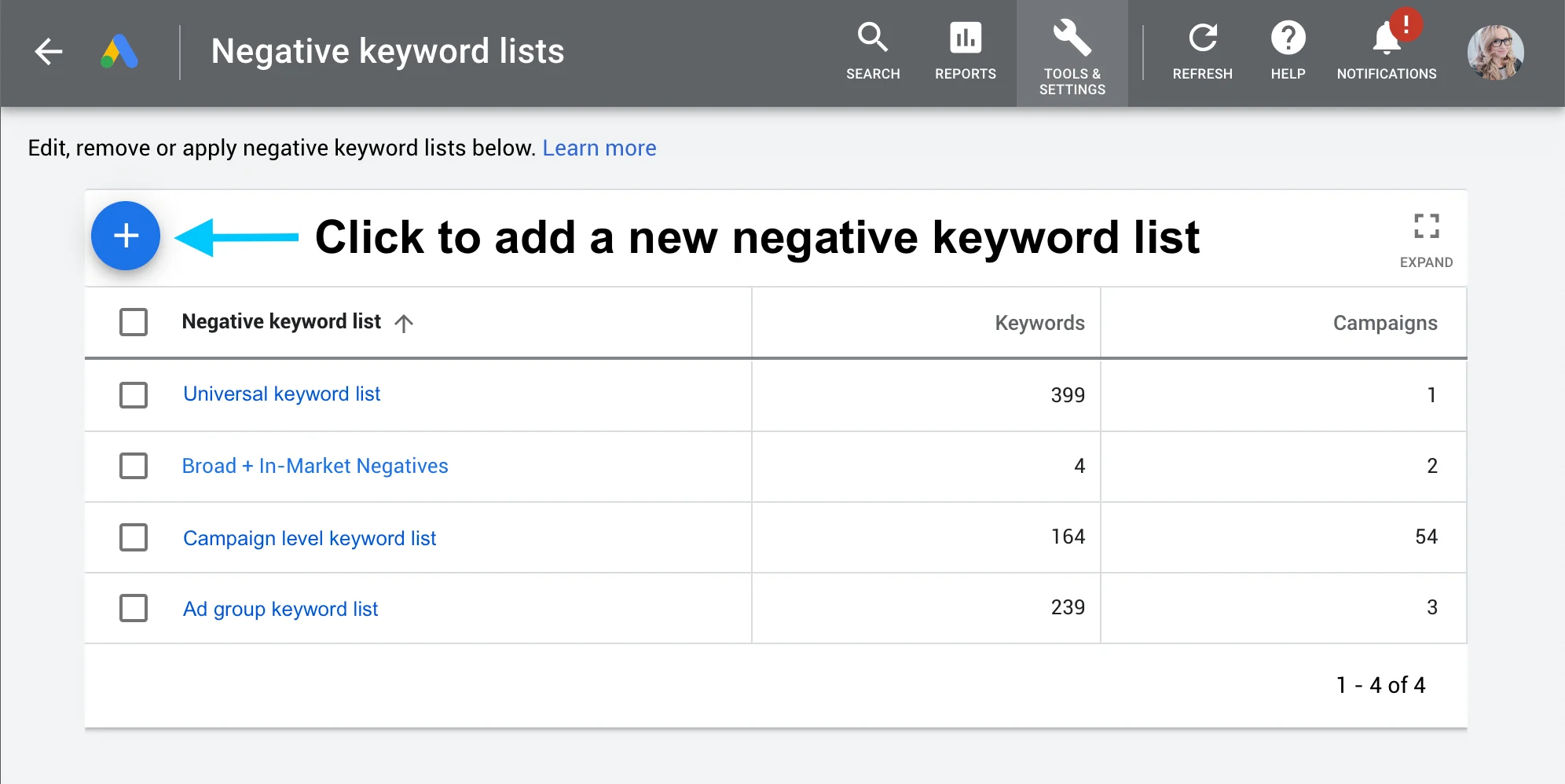
Build Shared Negative Keyword Lists
Large advertisers often organize negative keywords into reusable lists.
Examples include:
- Job seeker list
- Freebie list
- Educational list
- Support list
- Competitor support list
Shared lists improve account management efficiency.
Match Types Matter for Negative Keywords
Google Ads supports different negative keyword match types.
Understanding these is important.
Negative Broad Match
Blocks searches containing all negative keyword terms.
Negative Phrase Match
Blocks searches containing the phrase in the same order.
Negative Exact Match
Blocks only the exact search query.
Strategic use of match types provides greater control over traffic filtering.
Common Negative Keyword Mistakes
Negative keywords are powerful, but mistakes can also hurt campaign performance.
Blocking Too Aggressively
Over-filtering may accidentally remove valuable traffic.
Always review:
- Conversion data
- Search intent
- Revenue impact
before adding large exclusions.
Ignoring Long-Tail Search Queries
Many irrelevant searches come from long-tail variations.
Advertisers who only block obvious terms often miss hidden waste.
Failing to Update Lists Regularly
Search behavior changes constantly.
New trends, slang, seasonal searches, and AI-generated queries continue evolving.
Negative keyword management should be ongoing.
Assuming Google Understands Intent Perfectly
Automated systems are not perfect.
Google may still match ads to loosely related searches.
Human oversight remains essential.
Why Negative Keywords Improve Campaign Efficiency
A strong negative keyword strategy improves more than just cost savings.
Benefits often include:
- Higher click quality
- Better conversion rates
- Improved lead quality
- Stronger ad relevance
- Better audience alignment
- More efficient budget allocation
- Increased profitability
Traffic quality matters more than vanity metrics.
More clicks do not automatically mean better performance.
Building a Long-Term Negative Keyword Strategy
Successful advertisers treat negative keyword optimization as an ongoing process.
The best campaigns continuously refine:
- Search intent
- Traffic quality
- Audience targeting
- Keyword alignment
Long-term success requires:
- Regular audits
- Search query reviews
- Intent analysis
- Performance monitoring
- Continuous refinement
The goal is not simply attracting traffic.
The goal is attracting the right traffic.
Final Thoughts
Google Ads can be incredibly powerful, but wasted traffic can quickly destroy profitability.
Many advertisers focus heavily on finding new keywords while ignoring one of the most important optimization tools available:
Negative keywords.
By carefully filtering irrelevant searches, businesses can:
- Protect advertising budgets
- Improve traffic quality
- Increase conversion efficiency
- Reduce wasted clicks
- Generate stronger leads
- Improve overall campaign performance
The 20 negative keyword categories covered in this guide represent some of the most common sources of low-value traffic across industries.
Whether you run:
- eCommerce campaigns
- SaaS advertising
- local service ads
- B2B lead generation
- affiliate campaigns
- digital product promotions
negative keywords should be a core part of your advertising strategy.
The difference between profitable campaigns and expensive campaigns often comes down to one thing:
Not how much traffic you buy — but how much bad traffic you successfully avoid.