













 En
En
 11 min read
In today’s global e-commerce landscape, dropshipping has become one of the easiest ways to launch a business. You don’t need inventory, you don’t need a warehouse, and you don’t need a big team. What you do need, however, is a reliable and scalable platform — the foundation that powers your online store.
Three of the most debated choices among dropshippers are:
-
Shopify
-
WooCommerce
-
Custom-built independent websites (self-coded or agency-developed)
Each option has its own strengths, weaknesses, and hidden costs. Picking the right one can determine whether your dropshipping venture grows smoothly… or becomes a constant struggle filled with technical problems, rising expenses, and slow scalability.
This in-depth 4,000-word guide breaks down everything you need to know — features, performance, costs, flexibility, security, ease of use, and real-world suitability — so you can choose the platform that truly fits your business goals.
1. Why Your Platform Choice Matters More Than You Think
A dropshipping business does not control production or inventory. That means your website becomes your most important asset, responsible for:
-
Converting visitors into buyers
-
Generating trust
-
Processing payments securely
-
Communicating with customers
-
Providing a smooth shopping experience across devices
-
Handling spikes in traffic during ads or holidays
-
Integrating with suppliers, apps, and fulfillment tools
-
Allowing you to optimize SEO, speed, and checkout flow
The wrong platform can lead to:
-
Slow page speeds → high bounce rate
-
Payment failures → lost orders
-
Plugin conflicts → site crashes
-
Security vulnerabilities → stolen customer data
-
Lack of flexibility → inability to build your brand
-
Increasing monthly fees → lower profit
-
Difficult backend → wasted time
The right platform, however, allows you to:
-
Scale quickly
-
Convert more customers
-
Launch new products faster
-
Manage automation easily
-
Build a strong, independent brand
-
Run ads efficiently
-
Reduce technical headaches
Now let’s break down the big three options.
2. Shopify for Dropshipping: Strengths, Weaknesses & Ideal Users
Shopify has become the default dropshipping platform in recent years. It is famous for being beginner-friendly and offering a massive ecosystem of apps, themes, and integrations — especially for AliExpress, CJdropshipping, DSers, and U.S./EU suppliers.
2.1 Major Advantages of Shopify
(1) Extremely Easy for Beginners
Shopify was designed for non-technical users. You can build a complete store in a single afternoon:
-
Drag-and-drop builder
-
Pre-made professional themes
-
Automatic hosting
-
Built-in payment gateway
This allows first-time dropshippers to focus on products and marketing instead of coding or server configuration.
(2) App Ecosystem Tailored for Dropshipping
Shopify’s app marketplace is unmatched in the dropshipping world. You can install tools for:
-
Sourcing products
-
Importing items with one click
-
Automated order fulfillment
-
Real-time inventory sync
-
Tracking numbers auto-sync
-
Abandoned cart recovery
-
Upsell and bundle apps
-
AliExpress, CJ, and Print-on-Demand integrations
This ecosystem is one of Shopify’s biggest strengths.
(3) Stable, Fast, and Secure Hosting
All plans include:
-
Automatic server scaling
-
Built-in SSL
-
PCI-compliant payment handling
-
24/7 security monitoring
This means no server-related headaches.
(4) Excellent Checkout Flow (High Conversion Rate)
Shopify’s checkout page is optimized through millions of transactions. For ad-driven dropshipping, conversion rate often increases by:
-
+10% to +45% compared with DIY sites or WooCommerce
(5) Large Community and Support
You can easily find:
-
Tutorials
-
Developers
-
Store templates
-
Optimization strategies
Shopify is popular for a reason — the ecosystem is rich.
2.2 Disadvantages of Shopify
(1) Monthly Cost Adds Up Quickly
Shopify has fixed monthly pricing, but the real costs are:
-
Monthly plan
-
Paid apps (many $9–$99/mo each)
-
Transaction fees if not using Shopify Payments
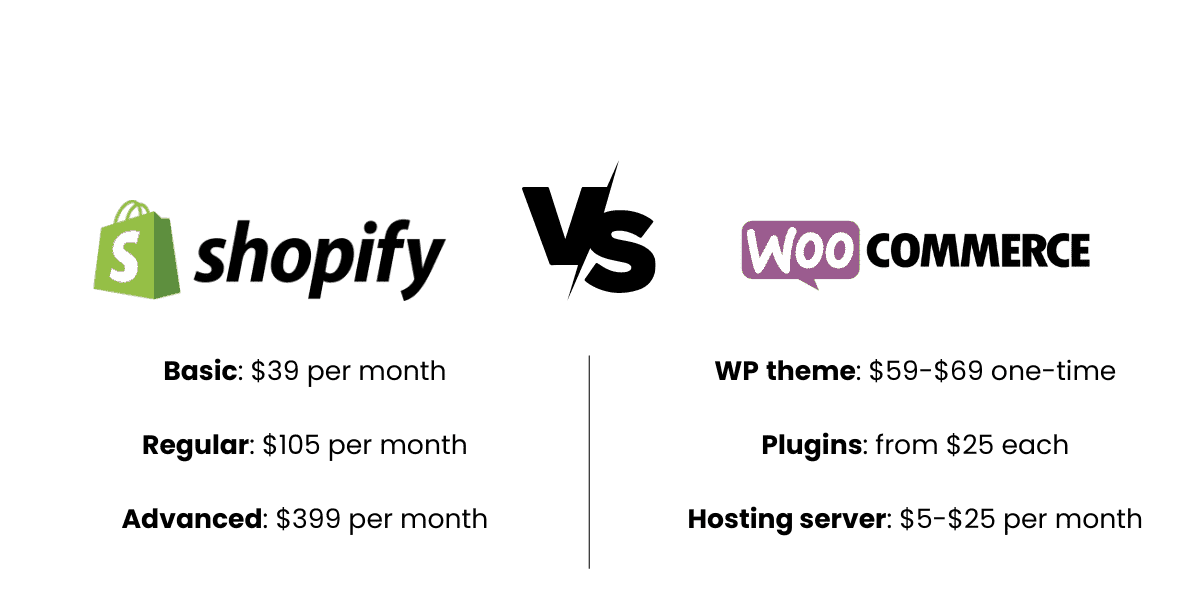
A beginner store might spend $50–$200/month easily.
As you scale, fees rise even higher.
(2) Limited Flexibility
Shopify is not open-source. Many things require:
-
Paid apps
-
Hiring Shopify developers
-
Workarounds
You cannot fully control the backend.
(3) You Don’t Fully “Own” the System
Shopify is a hosted SaaS platform. If Shopify bans a product category or terminates your account due to policy issues, you can lose access instantly.
(4) Custom functions require Liquid coding
Shopify uses its own template language, Liquid, which is different from PHP/JavaScript. You may need developers for advanced customization.
2.3 Best For
Shopify is ideal for:
-
Beginners who want fast setup
-
Ad-driven dropshipping stores
-
Print-on-demand sellers
-
Brands focusing on conversion optimization
-
Sellers who want a low technical workload
If your business depends on speed, convenience, and apps, Shopify is the strongest choice.
3. WooCommerce for Dropshipping: Strengths, Weaknesses & Ideal Users
WooCommerce is a free e-commerce plugin built on WordPress. It powers more than 40% of online stores and is known for its flexibility and openness.
3.1 Major Advantages of WooCommerce
(1) Completely Open and Customizable
You can edit every corner of the store:
-
Backend functions
-
Theme code
-
Server configuration
-
Checkout pages
-
Plugins
If you have technical skill (or a developer), WooCommerce offers unmatched freedom.
(2) Lower Cost (at First)
WooCommerce itself is free. Costs include:
-
Hosting ($5–$20/mo for basic, $30–$70/mo for high performance)
-
Themes ($0–$99 one-time)
-
Plugins (many free, some paid)
Overall, WooCommerce can be cheaper than Shopify if you keep things simple.
(3) SEO Superiority
WordPress is the king of SEO. You get:
-
Complete control over metadata
-
More flexible blogging
-
Faster ranking for content sites
-
Better long-term organic traffic
For content-driven e-commerce, WooCommerce wins easily.
(4) No Forced Transaction Fees
WooCommerce doesn’t take percentage cuts of your sales.
(5) Full Ownership
You own:
-
The domain
-
The database
-
The server
-
The e-commerce system
No risk of sudden platform bans.
3.2 Disadvantages of WooCommerce
(1) Higher Technical Requirements
You must manage:
-
Hosting
-
Domain setup
-
SSL
-
Server optimization
-
Plugin conflicts
-
Backup and security
-
Updates
For non-technical users, this can be overwhelming.
(2) More Maintenance
WordPress requires:
-
Regular updates
-
Performance tuning
-
Security patches
-
Database optimization
Without proper care, the site can become slow or unstable.
(3) Checkout Flow Not as Optimized
WooCommerce’s checkout is functional but not as optimized as Shopify’s battle-proven system. It may need:
-
Paid plugins
-
Custom UX design
-
Extra coding
to reach the same conversion rate.
(4) Fewer Dropshipping-Specific Tools
WooCommerce has dropshipping plugins, but quality varies and integrations are not as seamless as Shopify apps.
3.3 Best For
WooCommerce is ideal for:
-
Sellers who want full control
-
People with some technical skills
-
Content + e-commerce hybrid sites
-
Long-term branding
-
SEO-based marketing
-
Businesses wanting lower long-term costs
If you want ownership and flexibility, WooCommerce is the best option.
4. Custom Independent Sites (Self-Developed): Strengths, Weaknesses & Ideal Users
A custom-built independent site is created using:
-
Custom code (HTML/CSS/JS/backend languages)
-
Frameworks like Laravel, React, Vue, Next.js, Django, etc.
-
Or built by a professional development agency
These sites are fully independent — no Shopify, no WordPress, no rules.
4.1 Major Advantages of Custom Sites
(1) Absolute Flexibility
You can build anything you imagine:
-
Unique UI/UX
-
Custom checkout processes
-
Advanced product configurators
-
AI personalization
-
High-performance backend
-
Custom inventory or supplier integrations
You’re not limited by Shopify apps or WordPress plugins.
(2) Infinite Scalability
Large e-commerce brands (Nike, Zara, Shein) use custom-built systems because:
-
They scale better
-
They handle millions of visitors
-
They offer better performance
-
They integrate with warehouses, ERP, CRM, etc.
If you plan to build a long-term enterprise, custom solutions are unbeatable.
(3) No Platform Restrictions
No terms of service to worry about. No banned product categories. No surprise shutdowns.
(4) No Recurring Platform Fees
You only pay:
-
Hosting
-
Development
-
Maintenance
You don’t get charged per sale or per app.
(5) Completely Unique Branding
You can design the site exactly how you want, unlike Shopify templates that look similar.
4.2 Disadvantages of Custom Sites
(1) Very High Development Cost
A truly professional custom e-commerce site often costs:
-
$5,000–$50,000+ to develop
-
Additional fees for maintenance
For most small dropshippers, this is overkill.
(2) Requires a Technical Team
You need developers to maintain:
-
Security
-
Features
-
Integrations
-
Bug fixes
-
Hosting
-
Optimization
You must be prepared for ongoing expenses.
(3) Not Ideal for Beginners
If you’re new to dropshipping and just trying to validate a product, custom sites are too complex and costly.
(4) Longer Development Time
Compared with Shopify’s same-day launch:
-
Custom builds can take 1–6 months
Dropshipping usually requires speed — custom is slow.
4.3 Best For
Custom sites are ideal for:
-
Established brands
-
Larger companies
-
Enterprise-level dropshipping warehouses
-
Private-label brands
-
Sellers who need unique business logic
-
Projects requiring advanced software integration
This is the best option only once you mature beyond Shopify or WooCommerce.
5. Head-to-Head Comparison Table
| Feature | Shopify | WooCommerce | Custom Independent Sites |
|---|---|---|---|
| Ease of Use | ★★★★★ (Best) | ★★★☆☆ | ★☆☆☆☆ |
| Cost | Medium | Low–Medium | High |
| Flexibility | Medium | High | ★★★★★ (Unlimited) |
| Speed to Launch | ★★★★★ | ★★★☆☆ | ★☆☆☆☆ |
| Dropshipping Tools | ★★★★★ | ★★★☆☆ | Depends entirely on coding |
| SEO | Good | Excellent | Excellent (if well built) |
| Performance | High | Depends on hosting | Excellent (if optimized) |
| Ownership | Medium | High | Very High |
| Scalability | Medium–High | Medium | ★★★★★ (Best) |
| Conversion Rate | Very High | Medium | Depends on UX design |
| Ideal For | Beginners, ads-based stores | SEO-focused stores | Large brands, custom features |
6. Which Platform Should You Choose? (Real-World Scenarios)
Scenario 1: You’re a beginner launching your first dropshipping product
→ Choose Shopify
It’s the fastest, simplest, and most reliable way to start.
Scenario 2: You want to build a long-term brand with strong SEO traffic
→ Choose WooCommerce
WordPress gives unmatched control over content marketing.
Scenario 3: You run ads heavily and need a high-converting store immediately
→ Choose Shopify
Its checkout is superior for paid traffic.
Scenario 4: You want to create custom product builders, membership systems, AI features, etc.
→ Choose a Custom Independent Site
You’ll need full control.
Scenario 5: You want low operating costs and full ownership
→ Choose WooCommerce
It’s the best balance of cost and control.
Scenario 6: You’re scaling into a large business with complex logistics
→ Choose Custom Development
Shopify and WooCommerce will eventually hit limits.
7. Final Verdict: The Right Platform Depends on Your Strategy
There is no single “best” platform — only the best one for your business model.
Choose Shopify if:
-
You want a frictionless start
-
You run ads or viral products
-
You focus on speed and automation
-
You rely heavily on dropshipping apps
Choose WooCommerce if:
-
You want full ownership
-
You need flexible SEO tools
-
You want lower costs long-term
-
You have some technical ability
Choose Custom Sites if:
-
You’re building a large or advanced brand
-
You need unique features
-
You have a development budget
-
You want complete independence
8. Final Thoughts
E-commerce success is not determined by the platform alone — but by how well the platform matches your long-term strategy.
-
If you want speed → Shopify.
-
If you want freedom → WooCommerce.
-
If you want power → Custom sites.
Choose smartly, because your platform becomes the backbone of your entire business. With the right foundation, dropshipping can scale from a simple side hustle into a sustainable long-term brand.