















< Blogs

Dropshipping vs Print on Demand – Complete Guide for 2025

Vivan Z.
Created on November 26, 2024 – Last updated on February 6, 20253 min read
Written by: Vivan Z.

In 2025, the e-commerce industry continues to grow rapidly, and Dropshipping and Print on Demand (POD) are two of the most popular business models. Many entrepreneurs often find themselves torn between the two when deciding which type of e-commerce store to start. So, what are the key differences? Which model is better for you? In this article, we will thoroughly compare these two business models, discuss their pros and cons, and help you make a well-informed decision.

What is Dropshipping?

Dropshipping is an e-commerce business model. The retailer doesn’t keep inventory. Instead, they team up with a supplier. When an order comes in, the supplier ships the products straight to the customers. In this model, the retailer focuses on sales and marketing while the supplier takes care of product manufacturing, inventory management, and shipping.

For more details on dropshipping, check out our previous article on What is Dropshipping & How to Start.
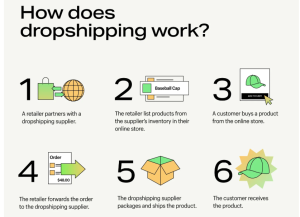
how does dropshipping work

What is Print on Demand?

Print on Demand (POD) is a custom e-commerce model where the retailer does not need to purchase large amounts of inventory upfront. Instead, products are printed and produced only when a customer places an order. This model is often used for custom items like T-shirts, mugs, posters, and more. It allows retailers to offer unique and personalized products without the need for upfront inventory investment.

For more detailed information on Print on Demand, refer to our earlier article on What is Print on Demand? A Beginner’s Guide to the Growing?.

Dropshipping vs Print on Demand: A Comparative Analysis
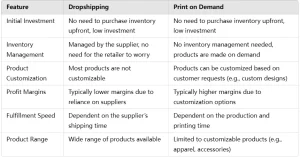
feature Dropshipping

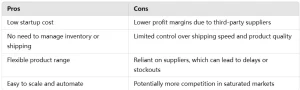
Dropshipping Pros & Cons
Dropshipping Pros&Cons

Print on Demand Pros & Cons


Dropshipping vs Print on Demand: A Comparative Analysis

Which One Should I Choose?

Instead of choosing between dropshipping and print on demand, the goal of this article is to help you gain a deeper understanding of both business models. By reading this guide, you should be able to make an informed decision about which industry or service is the best fit for you. Both models have their unique advantages, and your decision should be based on your business goals, target market, and product offerings.

Conclusion

As we discussed in the Dropshipping Pros section, services like DropSure can help streamline and enhance the dropshipping process. We encourage you to explore your options carefully and choose the model that aligns with your business vision and resources.

Buttom

DropSure is Your Best Partner
22 Years Experience
Affiliate Rebates
100% Quality Guarantee
Top-Up Rewards
10+ Global Warehouses
Custom Branding Support
Smart inventory System
24/7 Customer Support
Get a Quote in 24 Hours
Start Sourcing for Free

Keep Learning

In 2025, e-commerce has fully integrated into our daily lives. From placing orders while scrolling through TikTok to AI-powered product recommendations, the way consumers shop is becoming increasingly seamless and instinctive. In this landscape, if you’re looking to start your own online business with low cost and high efficiency, Shopify remains one of the best website-building platforms out there. So, what exactly is Shopify? What can it really do? And what’s new with Shopify in 2025?This guide will walk you through everything you need to know — in the most straightforward and practical way possible — to help you understand how Shopify works and how you can make the most of it this year. What is Shopify? In simple terms, Shopify is a platform specifically designed to help people “build e-commerce websites.” Whether you’re selling clothes, jewelry, digital products, e-books, courses, or even running a “dropshipping” business without holding any inventory, Shopify can meet your needs. If you’ve worked with WordPress before, you can think of Shopify as the “e-commerce version of WordPress,” but much easier to use. You don’t need to know any coding or worry about things like servers, plugins, or templates. Just sign up for an account, choose a template, and fill in some product information — within minutes, you’ll have your very own online store. The whole process is as easy as “moving in” — hassle-free and efficient. And Shopify isn’t just a simple template system; it’s a fully mature, end-to-end e-commerce backend platform, supporting: • Product management (pricing, inventory, categories, etc.) • Multi-channel sales (website, Facebook, Instagram, TikTok, Google, etc.) • Customer relationship management (membership systems, email marketing) • Order and logistics management • Online […]

As a communication tool with more than 2 billion monthly activities worldwide, WhatsApp has become a ‘golden channel’ for foreign traders to develop customers. I am well aware of the advantages and challenges, and I have also experienced all kinds of problems such as being stuck by the CAPTCHA when registering, and being banned when raising the number inadvertently. You, on the other hand, are probably facing the same problems, and even missing out on valuable orders as a result. Today, I will share my experience with you from the registration, raising the number, anti-blocking to customer acquisition of these four key links, to help you avoid risks and improve efficiency. Remember to bookmark it and be at the forefront of success! Download and Install  IOS Open the App Store, enter ‘WhatsApp’ in the search bar, find the official app and click ‘Get’ to download. After downloading, open the app and the system will automatically guide you to the registration process. Android Go to Google Play Store, search for ‘WhatsApp’ and click ‘Install’ button to download. Once the download is complete, open the app and follow the prompts to enter the registration page. PC At present, WhatsApp does not support direct account registration on PC. You need to complete the registration on your mobile phone first, and then sync WhatsApp to PC by scanning the QR code, just visit WhatsApp Web and scan the QR code with WhatsApp on your mobile phone to complete the sync. Mobile Number Verification When registering for a WhatsApp account, you will need to bind a mobile phone number. It is recommended to use a physical SIM card that supports international messaging (e.g. Google Voice […]

In New Zealand, as online shopping becomes increasingly mainstream and the local environment continues to support small businesses, more and more entrepreneurs are turning their attention to Dropshipping—a low-cost, highly flexible e-commerce model. This business approach doesn’t require you to hold inventory or invest a large amount of startup capital. With just a computer and a stable internet connection, you can run your own online store from the comfort of your home. For Kiwis looking to build a side hustle or generate online income, it’s an especially attractive option. As long as you know how to select products that match market demand, and pair them with basic branding and marketing strategies, Dropshipping can become your gateway to carving out a spot in the competitive e-commerce space. In this article, we’ll walk you through how the business model works, the steps to setting up your store, and the key pros and cons—so you can confidently take your first step into New Zealand’s growing dropshipping landscape. What is Dropshipping? In New Zealand, dropshipping has become an increasingly popular online retail model, especially among aspiring entrepreneurs. The biggest appeal? You don’t need to purchase inventory upfront or hold stock—you can run a full-fledged online store from home without investing a large amount of capital. Compared to traditional retail, dropshipping has a much lower barrier to entry and offers greater flexibility, making it ideal for those with limited startup funds or people looking to build a side hustle while balancing work and family life. The process is straightforward: set up an online store (popular platforms include Shopify, WooCommerce, and even local sites like Trade Me), choose products from a supplier, and upload the product information […]

Recommended for you