















< Blogs

Shopify or WordPress: Which One is Better for Dropshipping?

Vivan Z.
Created on November 21, 2024 – Last updated on February 6, 20255 min read
Written by: Vivan Z.

Shopify vs WordPress

If you’re starting a dropshipping business, Shopify and WordPress are two popular platforms to choose from. Both have their strengths and weaknesses, but the right one depends on your skills, business needs, and future plans. Let me break it down in simple terms to help you decide.


Shopify: Easy and Perfect for Beginners

Shopify

Shopify is made for e-commerce, and it’s super simple to use. Don’t know coding? No problem! Shopify has tons of ready-to-use templates. It’s like building with Lego blocks—you just drag, drop, and create your store. It comes with built-in tools for payments, shipping, and managing orders. This saves you time and lets you focus on selling.

shopify template

Shopify also has a massive app store. You’ll find tools like Oberlo and Importify to quickly add products, Klaviyo and MailChimp for email marketing, and Privy or Upsell to boost sales. These apps make dropshipping smooth and stress-free.
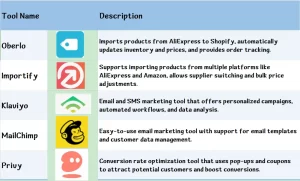
tools

But Shopify isn’t cheap. The basic plan starts at $29/month, and as your store grows, you might pay more, especially if you use third-party payment gateways. Also, if you want very specific designs or functions, Shopify can feel limiting.


WordPress: Flexible and Powerful, but Needs Tech Skills

Wordpress

WordPress, on the other hand, is a powerful option if you want more control. By adding the WooCommerce plugin, you can turn WordPress into a full e-commerce platform. The biggest advantage? Flexibility. You can design your store however you like and customize features such as payment methods or shipping options.
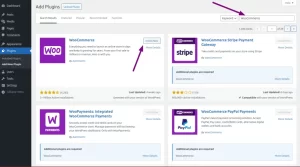
Woocommerce
Searching and showing the WooCommerce plugin via the Add Plugin WordPress screen.

WordPress is open-source, meaning there are endless plugins and resources available. It’s also cheaper—just pay for hosting and a domain, which costs less than Shopify’s monthly fees.

But here’s the catch: WordPress is not beginner-friendly. If you’re not tech-savvy, setting up plugins, payment systems, and optimizing your site can be overwhelming. And when things go wrong, there’s no centralized support. You’ll need to figure it out yourself or rely on online forums.


Who Should Choose Shopify?

Shopify is perfect if you’re new to e-commerce or want to start fast. It’s simple, has everything you need in one place, and their support team is always there to help. You can focus on selling without worrying about technical stuff.


Who Should Choose WordPress?

Go with WordPress if you know a bit about websites or don’t mind learning. It’s highly customizable and great for unique designs or features. Plus, it’s cheaper long-term. If you’re planning to scale and want full control, WordPress is a smart choice.


Which Platform Has Lower Long-Term Costs: Shopify or WordPress?
dropshipping

When comparing Shopify and WordPress, WordPress generally has lower long-term costs, especially if you manage your site efficiently. Here’s why:


WordPress: Lower Long-Term Costs

No Ongoing Subscription Fees
WordPress itself is free. You’ll only pay for hosting (starting around $5–$15/month), a domain (around $10–$20/year), and any plugins or themes you choose to add. Many plugins are free or have affordable one-time fees.

Customizable for Budget
WordPress allows you to scale costs based on your needs. If you’re on a budget, you can use free plugins and themes. As your business grows, you can invest in premium tools without paying a fixed monthly fee.

No Transaction Fees
WordPress doesn’t charge transaction fees unless you use certain payment gateways that have their own fees. You’ll save more as your revenue grows.


Shopify: Higher Costs Over Time

Monthly Subscription Fees
Shopify starts at $29/month and can go up to $299/month for advanced plans. These fees are unavoidable as long as you use the platform.

Transaction Fees
If you use a third-party payment gateway (like PayPal or Stripe), Shopify takes an additional transaction fee (0.5%–2%), which can add up as your sales increase.

App Costs
Many Shopify apps require monthly fees, and these can stack up quickly if you need multiple tools for your store.


Final Advice

If you’re a beginner, Shopify is the way to go—easy, quick, and hassle-free. If you’re more experienced or willing to learn, WordPress gives you more flexibility and control. Either way, pick the one that fits your needs, and take the first step toward building your dropshipping business. Success is waiting for you!

Buttom

DropSure is Your Best Partner
22 Years Experience
Affiliate Rebates
100% Quality Guarantee
Top-Up Rewards
10+ Global Warehouses
Custom Branding Support
Smart inventory System
24/7 Customer Support
Get a Quote in 24 Hours
Start Sourcing for Free

Keep Learning

As the secondhand fashion economy thrives, Poshmark, one of North America’s largest resale platforms, has attracted millions of users. However, newcomers often prioritize two critical questions: Is Poshmark legal? Are transactions secure here? This article will delve into the platform’s operational mechanisms and provide an essential guide for buyers and sellers before engaging in transactions. Is Poshmark legal Poshmark was founded in 2011 and is headquartered in California, USA. It is a compliant enterprise regulated by law. Its business model is similar to eBay or Etsy, earning profits by connecting buyers and sellers and charging commissions. The platform supports transactions for fashion items such as clothing, shoes, bags, and accessories, and even allows the resale of luxury goods. As of 2025, Poshmark has over 80 million users and was acquired by the Korean internet giant Naver, which further strengthens its financial and operational stability. From a legal perspective, Poshmark requires users to comply with intellectual property laws and prohibits the sale of counterfeit or prohibited items. If a user violates the rules, the platform may freeze the account or hand the case over to judicial authorities. Therefore, as long as users follow the platform’s rules, the transactions themselves are entirely legal. However, legality and safety are not entirely equivalent—personal operational risks in the buying and selling process still need to be guarded against. How to Avoid Pitfalls in the Shopping Process As a buyer, how can you avoid pitfalls in the shopping process? First, be alert to the risks of counterfeit goods and overly embellished product descriptions. Although the Poshmark platform allows individual sellers to upload various products, its authentication service for luxury goods only applies to items with a unit […]

Facebook is huge in the digital marketing world. It’s one of the biggest social media platforms out there, and it’s got tons of ways for businesses to reach and convert customers. But to really get results, you need to have a clear strategy and use the right methods. That’s where this guide comes in. It’ll give you all the info you need to make the most of Facebook and take your business to the next level. Define Your Business Goals Decide your business goals on Facebook before attracting customers.Take a moment to ask yourself this simple yet crucial question: “What exactly do I want to achieve with Facebook?”Don’t rush past this step—clear goals are like a destination on a map. Without them, your marketing journey could easily lose direction.Here are some common goals to consider—see which ones align with your needs:Boost brand awareness: just started your business or still relatively unknown? No worries! Facebook can help you get noticed through engaging content and well-crafted ads that quickly put your brand in front of potential customers. Drive Traffic to Your Website or Store: Whether your goal is to increase website visits or bring more foot traffic to your store, Facebook ads and promotions have you covered. Don’t forget to include clear calls-to-action (CTAs) like “Visit Now” or “Learn More,” so users know exactly what to do next. Increase Product or Service Sales: If you’re looking to sell, Facebook’s precision targeting features are your best friend! Use dynamic ads or showcase shopping features to make buying as easy as a click. Launch a New Product: Got a new product to introduce? Great! Now’s the time to grab attention. Create a fun and […]

In e-commerce, product research is the difference between steady growth and unpredictable revenue swings. Some products skyrocket for three months and disappear. Others grow quietly and sell consistently for years. If you’re building a sustainable online business — especially in niches like home décor, UV lamps, mosquito traps, or custom eyewear — understanding the difference between a seasonal bestseller and an evergreen product is critical. One of the most powerful free tools for identifying product demand patterns is Google Trends. Most sellers use it at a surface level: type in a keyword, glance at the chart, and make a quick judgment. But advanced users go much deeper. They analyze multi-year cycles, geographic shifts, breakout queries, and cross-comparison overlays to separate temporary hype from durable demand. This comprehensive guide explores advanced strategies for using Google Trends to distinguish seasonal spikes from long-term winners — so you can make smarter inventory, advertising, and product development decisions. Why the Seasonal vs. Evergreen Distinction Matters Before diving into advanced techniques, let’s clarify why this distinction is so important. Seasonal Bestsellers Experience predictable annual spikes Often tied to weather, holidays, or events Require inventory timing precision Can produce intense short-term revenue Risk stockouts or overstock Examples: Mosquito traps in summer Space heaters in winter Graduation gifts in spring Evergreen Products Maintain relatively steady demand year-round May grow gradually over time Provide predictable revenue flow Reduce inventory volatility Examples: Reading glasses Blue light blocking eyewear Home air purifiers Misidentifying a seasonal product as evergreen can lead to excess inventory. Mislabeling an evergreen product as seasonal can cause missed scaling opportunities. Google Trends helps you see the difference — if you know how to interpret it correctly. […]

Recommended for you