
















< Blogs

Mastering USPS Tracking: Tips to Stay Updated on Your Packages

Vivan Z.
Created on December 13, 2024 – Last updated on February 6, 202513 min read
Written by: Vivan Z.

USPS2

Ever felt the thrill of waiting for a package, only to wonder where it is? We’ve all been there. For e-commerce sellers and everyday shoppers, tracking a shipment is like watching the journey of a tiny traveler. USPS tracking is your trusty guide. In this blog, we’ll decode tricky statuses like “label created not yet in system” and “in transit to next facility,” and share tips to make tracking easier. Stick around, we’ve got you covered!

What is USPS?
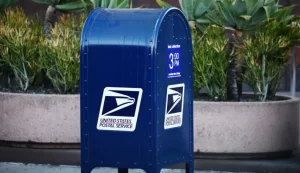
A USPS BOX

The United States Postal Service, or USPS, has a rich history that dates back to 1775. It began as a service to connect the American colonies, delivering letters and official documents during a time when reliable communication was a luxury. Fast forward to today, USPS has become one of the most recognized and trusted names in the world of mail and logistics. It’s not just about delivering letters anymore—it’s about connecting people and businesses across the globe with speed and efficiency.

A Brief History of USPS

USPS was officially established by Benjamin Franklin, who became the first Postmaster General. Back then, its mission was simple: to ensure that letters and packages could reach every corner of the newly formed United States. Over the centuries, USPS has adapted to the changing needs of society. From horse-drawn carriages to planes and advanced logistics networks, it has always embraced innovation to stay relevant. Despite the rise of digital communication, USPS remains an essential service, handling billions of pieces of mail each year.

USPS Service Offerings

USPS offers a variety of services tailored to meet different needs. Here’s what they provide:
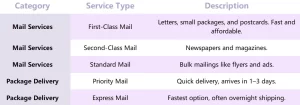
USPS Service

Mail Services

USPS is known for its standard mail delivery options, designed for personal and business needs:

● First-Class Mail: Ideal for letters, small packages, and postcards. It’s fast, affordable, and reliable.
● Second-Class Mail: Used primarily for newspapers and magazines.
● Standard Mail: Perfect for bulk mailings, like flyers and advertisements.

Package Delivery Services

For larger shipments, USPS offers solutions that prioritize speed and convenience:

● Priority Mail: A go-to option for quick and affordable delivery. Most packages arrive in 1–3 days.
● Express Mail: The fastest option for urgent deliveries, often with overnight shipping.

International Shipping

USPS connects the U.S. to the rest of the world with its range of international mail services:

Send letters, packages, or commercial shipments to over 190 countries.Choose options like Priority Mail International for faster delivery or First-Class International for more economical shipping.

Value-Added Services

Need extra security or confirmation? USPS has you covered:

● Insurance: Protect your valuable shipments against loss or damage.
● Registered Mail: Offers the highest level of security for sensitive items.
● Return Receipts: Get proof of delivery for added peace of mind.

Features and Benefits of USPS

USPS isn’t just about delivering mail; it’s about reliability, accessibility, and convenience. Let’s break down its key features:

● Universal Delivery

One of USPS’s defining traits is its universal service. This means no matter where you are in the U.S.—whether in a bustling city or a remote rural area—USPS will deliver to your address. It’s a promise few services can match.

● Real-Time Tracking

USPS offers a robust tracking system, allowing customers to monitor their mail or packages from the moment they’re sent until they’re delivered. Whether you’re shipping a birthday gift or waiting for an important document, you’ll always know where it is.

● Postal Storage

What happens if you’re not home to receive a package? USPS provides a convenient solution by holding your mail at your local post office. They’ll notify you, so you can pick it up at your convenience.

● Cost-Effective Options

USPS is known for offering affordable rates compared to private carriers. This makes it a favorite among small businesses, e-commerce sellers, and everyday consumers who need reliable delivery without breaking the bank.
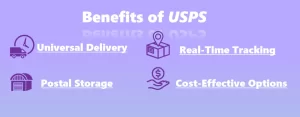
Benefits of USPS


How USPS Tracking Works

USPS tracking is a straightforward yet powerful tool that keeps you updated on your shipment’s journey. Here’s how it works and what to do if you lose your tracking number.

How USPS Generates and Updates Tracking Numbers

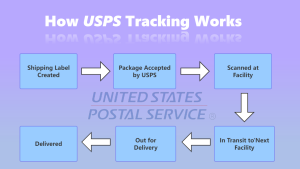
Every USPS shipment is assigned a unique tracking number. This number acts like a digital fingerprint for your package, helping you track its movement from start to finish. Here’s what happens:

1.Shipping Label Creation
When a package is prepared for shipping, the sender creates a shipping label. This label includes a barcode with the tracking number.

2.Scans at Checkpoints
As your package moves through the USPS network, it’s scanned at multiple locations, such as sorting facilities and post offices. These scans update the tracking system with statuses like “Accepted,” “In Transit,” or “Out for Delivery.”

3.Delivery Confirmation
Once your package is delivered, the tracking system records the final status as “Delivered.” This ensures you always know where your package is, even after it reaches its destination.
How USPS Tracking Works 2

Where to Find Your USPS Tracking Number

Your tracking number can usually be found in one of these places:

● Receipt from the Post Office: If you shipped the package in person, it will be printed on your receipt.

● Shipping Confirmation Email: For online purchases, the seller often includes the tracking number in the confirmation email.

● Shipping Label: If you’re the sender, the tracking number is printed on the shipping label.

What to Do If You Don’t Have a Tracking Number

Losing a tracking number can be frustrating, but there are ways to address the issue:

1.Check Your Records
Look through your email for any shipping confirmations or receipts. Retailers often send tracking information automatically.

2.Visit Your Local Post Office
Provide details like the date, recipient’s address, and shipping method. USPS staff might be able to locate the tracking information for you.

3.File a Missing Mail Search
If you’ve lost the number and the package is overdue, you can initiate a search request with USPS. Start the process here.

Tracking Without a Tracking Number

While USPS doesn’t offer real-time tracking without a number, you can try the following options:

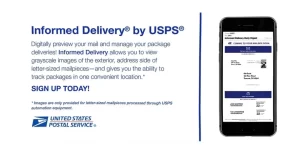
Informed Delivery®: Sign up for USPS’s free Informed Delivery service to see images of incoming mail and track packages linked to your address.
Informed Delivery by USPS


● Contact the Sender
: For purchases, the sender may have access to the tracking details.
Decoding USPS Tracking Statuses

USPS tracking updates can sometimes feel like a puzzle, but once you understand the meaning behind the statuses, you’ll have peace of mind about your package’s journey. Let’s break down two of the most common (and sometimes confusing) tracking statuses.


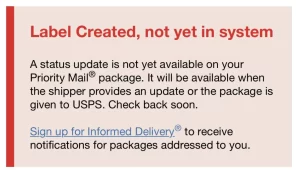
1. “Label Created, Not Yet in System”

Label Created, Not Yet in System


This status shows up when the shipping label is generated, but the package hasn’t been scanned into the USPS system yet. Here’s what’s happening:

It means The sender has printed a label, but USPS hasn’t physically received the package yet. It could still be at the sender’s location, waiting to be picked up or dropped off.

● What to Do:

○ Check with the sender to confirm when the package was handed over to USPS.

○ Give it 24–48 hours for the package to be scanned and updated in the system.


2. “In Transit to Next Facility”

This status indicates that your package is moving through USPS’s logistics network. But what does it really mean?

It means your package has left one USPS facility and is on its way to the next processing center or delivery unit. It’s in the hands of USPS and actively moving toward its destination.

This status doesn’t provide details on the exact location of your package, which can leave you guessing.

▪ What to Do:

○ Be patient. Updates usually appear once the package is scanned at the next facility.

○ If this status doesn’t change for more than 48 hours, you can contact USPS or submit a missing package request here.


What to Expect with Other USPS Tracking Statuses

▪ “Out for Delivery”: Your package is on the delivery vehicle and will arrive that day.

▪ “Delivered”: The package has been successfully delivered to the recipient.

▪ “Delivery Attempted”: USPS tried to deliver your package, but no one was available to receive it. Check for a delivery notice.

If you’re looking for your package or experiencing tracking issues, click on the USPS FAQ page. This page provides detailed answers, including the meaning of tracking statuses, possible reasons for delays, and steps to take if tracking information hasn’t been updated.

Understanding these statuses takes the guesswork out of waiting for your package. If tracking delays or unclear updates are common challenges for your business, consider using smarter logistics tools like DropSure to streamline your tracking process. They’ll ensure you stay in the loop every step of the way!


Overcoming USPS Tracking Challenges

Sometimes USPS tracking doesn’t go as smoothly as expected. Whether it’s delayed updates or confusing errors, tracking issues can leave you frustrated. But don’t worry—there are steps you can take to resolve them quickly.


What to Do When Tracking Information Isn’t Updating 


If your tracking status hasn’t changed in a while, it could mean the package is in transit without a recent scan. Here’s how to handle it:

1.Wait for 2448 Hours
Tracking updates often lag, especially during busy shipping seasons. Give it a day or two before taking further action.

2.Check the Delivery Timeline
Review the expected delivery date provided during shipping. Your package may still be on schedule, even if tracking hasn’t updated.

3.Verify the Tracking Number
Ensure you’ve entered the correct tracking number on the USPS tracking page. A simple typo can cause confusion.

4.Sign Up for Informed Delivery
If the package is addressed to you, use USPS’s free Informed Delivery® service to monitor incoming mail and packages.


USPS

 
How to Handle Incorrect or Missing Tracking Information

When tracking shows an error or doesn’t seem to reflect the package’s real status, take these steps:


Contact the Sender
If you’re the recipient, reach out to the sender. They may have additional shipping details or can initiate an inquiry with USPS.


Visit Your Local Post Office
Bring the tracking number and shipment details to your local USPS office. They might have more information than what’s visible online.


File a Missing Mail Search
If your package hasn’t arrived and the tracking hasn’t updated for an extended period, you can initiate a search:

▪ Visit the USPS Missing Mail page.
▪ Provide as much detail as possible, including the tracking number, package contents, and sender/recipient information.


Submit a Service Request
If you believe there’s an error or a delivery issue, contact USPS customer service directly:

▪ Call: 1-800-ASK-USPS (1-800-275-8777).
Online Inquiry: Use the USPS Help Request form to submit your concern.


Simplify Tracking with DropSure

Let’s be honest—traditional package tracking can be a headache. Delayed updates, unclear statuses, or juggling multiple tracking numbers across platforms can easily leave you frustrated. For e-commerce sellers, it’s even tougher to manage logistics while keeping customers happy. That’s where DropSure comes in to save the day.


How DropSure Makes Tracking Easier


DropSure is a smart logistics solution built to simplify package tracking for e-commerce sellers. Here’s how it works:

▪  Unified Dashboard: Track all your orders from multiple carriers in one place. Say goodbye to switching between websites.

▪  Real-Time Updates: Get accurate, up-to-the-minute tracking information for every shipment. No more guesswork.
▪  Automated Alerts: Notify your customers about their package status without lifting a finger. Keep them informed and happy.

▪  Data Insights: Analyze your shipping performance with powerful tools to optimize delivery times and reduce costs.


Sign Up for DropSure Today

Why settle for tracking headaches when you can have stress-free logistics? Join thousands of e-commerce sellers who’ve streamlined their operations with DropSure.

? Sign up now and experience a smarter way to manage orders and shipments!


Blog Buttom

DropSure is Your Best Partner
22 Years Experience
Affiliate Rebates
100% Quality Guarantee
Top-Up Rewards
10+ Global Warehouses
Custom Branding Support
Smart inventory System
24/7 Customer Support
Get a Quote in 24 Hours
Start Sourcing for Free

Keep Learning

In today’s hyper-competitive ecommerce landscape, launching a “me too” product is a fast way to burn through capital. The sellers who win aren’t just sourcing popular items—they’re identifying unmet customer needs hidden in plain sight. And where are those unmet needs hiding? In Amazon reviews. Buried inside thousands of four-star complaints, three-star frustrations, and even five-star “almost perfect” comments are clues to products customers wish existed—but haven’t found yet. With the right approach, ChatGPT can help you systematically extract, organize, and interpret these signals. Instead of guessing what to sell, you can reverse-engineer demand directly from real buyer experiences. This guide walks you through a step-by-step framework for using ChatGPT to analyze Amazon reviews at scale, uncover recurring dissatisfaction patterns, and turn customer complaints into product opportunities. Why Amazon Reviews Are a Goldmine for Product Research Amazon reviews are one of the richest publicly available sources of consumer insight. They contain: Direct feedback from verified buyers Honest frustrations Comparisons to competitors Usage scenarios Feature requests Repeated complaints Emotional reactions Unlike surveys, reviews are unsolicited and written in customers’ own words. That makes them incredibly valuable. Most sellers skim reviews. Smart sellers mine them. The Concept of “Pain Point Products” A pain point product isn’t just trending—it solves a recurring problem better than current options. Look for: Repeated complaints about durability “I wish it had…” statements Frustrations about sizing or fit Design flaws Missing features Quality inconsistencies Packaging problems Misleading descriptions Your goal isn’t to invent something random. It’s to fix what customers are already telling you is broken. Why ChatGPT Is Powerful for Review Analysis Manually reading 1,000 reviews is exhausting and inefficient. ChatGPT helps by: Summarizing large datasets Categorizing […]

If you’re exploring efficient and cost-effective ways to manage your dropshipping business, Dropsure is your ultimate partner. From product sourcing to order fulfillment, we provide a seamless solution tailored for beginners and seasoned sellers alike. This guide will walk you through everything you need to know about working with Dropsure, ensuring your journey is as smooth as possible. Guidance of registration 1.1 How to register Dropsure? Search our website: https://www.dropsure.com/ Fill out the form below. 1.2 How to link my store? After logging in, connect your Shopify Store to Dropsure by inputting your URL on the search space. You can check if your Shopify Store has successfully connected to Dropsure by going to the Store Management Page. Products 2.1 search and publish product Find the products you need under the ‘Products’ tab and publish them to your store by clicking the small yellow shop icon at the bottom right corner of the desired product image. 2.2 buy products Click ‘Buy Now’ on the Public Catalogue, then complete the following steps on Dropsure.  2.3 Branding Select packaging under the ‘Products’ tab and upload your own logo. Next, go to the ‘Public Catalogue’, select the product you want, and click ‘Branding’ in the ‘Recap’ column. Then, click ‘Select’ to choose the logo you uploaded. Orders 3.1 connect your store and sync orders First, you click the “store management” to connect your store, it’s very easy to operate. Then you can click”Order” tab to check your orders, sync your orders of the store for some days.  3.2 Ask for quotation You can click “Ask for Quote” to get quotation for your orders. Usually it may take about 24 hours. If you are in a hurry, please contact […]

Behind every “overnight success” product is usually a boring—but repeatable—workflow built on data, tools, and disciplined decision-making. Product research tools don’t magically tell you what to sell. What they do is help you eliminate bad ideas faster and validate good ones with confidence. This guide will walk you through the entire product research process, step by step: From keyword discovery To demand validation To competitor analysis To final product decision-making No hype. No shortcuts. Just a clear, practical system you can apply immediately. 1. Why Product Research Tools Matter (and Why Most People Use Them Wrong) 1.1 Tools Don’t Find Products—People Do A common beginner mistake is expecting a tool to say: “Sell this product. You will make money.” That never happens. Tools provide signals, not answers: Search demand Market saturation Price ranges Competitor behavior Your job is to interpret those signals logically. 1.2 The Real Goal of Product Research The goal is not to find: The cheapest product The trendiest product The most “cool” product The real goal is to find a product with: Clear demand Manageable competition Room for differentiation Healthy margins Every step in this guide supports one of those four criteria. 2. Step One: Start With Keywords, Not Products 2.1 Why Keywords Come First Many beginners start by browsing: Supplier websites TikTok trends “Winning product” videos That’s backwards. Keywords represent real buyer intent. If people are searching for something consistently, demand already exists. 2.2 What Makes a “Good” Product Keyword? A strong product keyword usually: Describes a specific use case Is not overly generic Signals buying intent Examples: ❌ “lamp” ✅ “portable camping lantern” The second keyword tells you: Who the user is Where it’s used […]

Recommended for you