














 En
En
 16 min read
Many foreign traders are using LinkedIn as a social platform to a greater or lesser extent, but everyone uses it in a different way and in a different depth. Some people use it as a tool to analyse customer information, some people use it to promote and attract traffic, some people use it to find customers’ emails, and some people make it an efficient customer development tool.
Today, I want to talk to you: how I make LinkedIn the secret of inquiry (order) production line, and how to make full use of LinkedIn to achieve the ultimate goal of developing foreign customers, marketing and promoting products. If you can follow my ideas and methods, and take care of your LinkedIn account, then soon you will be in the same state when you open LinkedIn every day:
● A rich source of clients through LinkedIn;
● A steady stream of valid enquiries;
More importantly, you will have a ‘traffic pool’ of your own, which has sustainable value growth, and a persuasive and good personal brand image.
An Introduction to LinkedIn
Before the formal explanation, let’s first learn about LinkedIn: LinkedIn is dedicated to providing a communication platform to the world’s working professionals and assisting them to utilise their strengths and build exclusive connections. As a global professional social networking site, LinkedIn has more than 500 million members worldwide. Here you can easily build your professional image, gain business insights, expand your professional network and discover more career opportunities.
We know that LinkedIn’s positioning is a professional social networking site, so we need to fit the positioning of LinkedIn to present ourselves, and know how to shape and present our professional attributes, work attributes and business attributes on it. Next, we will take a few steps to proactive client development and client marketing follow-up.
LinkedIn Profile Photo Design
When we portray ourselves on LinkedIn, the choice of avatar is really important. Not only is it the first impression people have of you, but a good avatar can also increase your success rate in friending people and converting customers. This is really not an exaggeration.
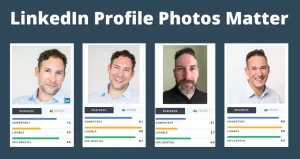
So, which avatars are not suitable?
● Landscape photos or pictures of animals;
● Photos of pets or cars;
● Kids or group photos;
● Photos that are cute or funny;
● Photos that are too sexy or show off your body;
● Pictures of products or exhibitions;
● Pictures of cartoon characters or celebrity icons;
● And then there are those avatars wearing sunglasses, posing with scissors, art photos, wedding photos, beauty filter effects, or simply no avatar at all.
What should an ideal LinkedIn avatar look like?
● Do not use any product images or images with logos;
● Do not use avatars or pictures of other people;
● It must be a frontal photo of yourself;
● Keep a bright, decent and friendly smile;
● choose a simple background and avoid an overly eye-catching background.
By choosing our avatars carefully, we can present a professional and friendly image on LinkedIn, laying a solid foundation for building good professional connections. Let’s work together, manage our LinkedIn account with care, and let it be a boost to our career success.
Crafting Your LinkedIn Profile
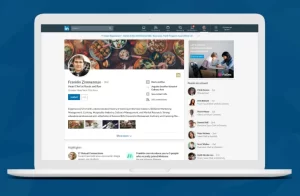
Designing to create a perfect Collage profile is likewise a crucial step, and it mainly contains:
| Serial No. | LinkedIn Profile Component | Description |
| 1 | Name (First name/Last name) | Enter your full name, ensuring it aligns with your professional identity. |
| 2 | Headline | Briefly and clearly describe your professional role and value proposition. |
| 3 | Current Position | List your current position and company name. |
| 4 | Location (Country/Province/State/City/District) | Provide your geographic information to help establish trust and relevance. |
| 5 | Industry | Specify your industry to help LinkedIn algorithms better recommend and match opportunities. |
| 6 | Summary | Provide an overview of your professional background, expertise, and career goals, showcasing your personality and value. |
| 7 | Work Experience | Detail your work history, including company names, positions, duration, and key responsibilities. |
| 8 | Education | List your educational background, including school names, majors, and graduation dates. |
| 9 | Skills | Highlight your professional and soft skills to help others understand your abilities. |
| 10 | Contact Info (Profile URL/Email) | Provide contact information, including personal website links, email, etc., to facilitate communication. |
| 11 | Accomplishments | Showcase your professional achievements and honors to boost credibility and appeal. |
| 12 | Media | Upload images, videos, presentations, etc. related to your work or profession to enhance engagement. |
Name (First name/Last name)
It is recommended to use a combination of “English name + abbreviated core product or industry keyword/company name” to clearly convey who you are and the product field or company you belong to.
Note: If you are newly registered on LinkedIn, please make sure to enter your real Chinese name during registration. Once logged in, you can then make targeted optimizations and adjustments.
Headline
First, consider what your customers need, and then construct your headline as “core product or industry keyword + core product or industry keyword + manufacturer/service provider/supplier/product manager/expert of XX product or service.” It is advisable to avoid directly using the term “sales” since it may leave an impression of overt promotion, which could lower customer favorability.
Note: Your name and headline are the most critical parts. Ensure that these descriptions are closely aligned with customer needs and benefits, as these two items are primarily displayed in your connection requests, directly affecting whether customers are willing to add you and your visibility in searches.
Summary
Your summary should include who you are, the products or services you offer, your advantages, the benefits you bring to customers, as well as any authoritative certifications, website, and contact information. In addition, include media or project files to showcase company culture, personal charisma, exhibition photos, production processes, or customer group photos. This not only increases persuasiveness but also prevents the content from being monotonous.
Work Experience and Education
Provide as much detail as possible for each item. The more complete your information is, the higher the trust customers will have in you. Accompanying relevant photos and links can further enhance your overall image.
Note: The quality and layout of each section are crucial. Neat and well-organized profiles are more likely to attract customers, thereby creating more sales opportunities for you.
Skills
This section is often overlooked. It is recommended to combine the system’s suggested content with core product or industry keywords to ensure that your skills accurately reflect your professional capabilities.
Accomplishments
This part is also commonly neglected. You can collect and fill in relevant materials, such as projects completed with clients, exhibitions attended, personal growth experiences, or company events, to showcase your achievements and strengths.
Contact Info / Profile URL / Email
Pay special attention to customizing your Profile URL. It is recommended to create a memorable and professional Profile URL using core product or industry keywords.
Self-protection settings for LinkedIn accounts
For most of the Chinese Leaderboard users engaged in foreign trade, the fear of competitors snooping on their Leaderboard accounts and poaching customers is a common concern. Therefore, the first thing we need to do is to learn how to set up self-protection settings. In ‘Settings & Privacy’ and ‘Edit Public Profile & URL’, we recommend you to customise your privacy settings according to your personal needs to ensure the security of your account information.
In addition, you need to control your friends at the source, strictly screen your friends, avoid adding unfamiliar or unrelated people, and be cautious about accepting friend requests from others. Most importantly, you must continue to improve yourself and enhance your professional ability to ensure that you always stay ahead of your peers, which is fundamental to long-term development.
At the same time, you can also try to reverse the process by scrutinising your competitors’ Leaderboard accounts and digging into them for possible customer leads. However, it’s important to remain cautious when doing so, ensuring that all actions are both compliant and ethical, and avoiding excessive risk-taking.
Build Your Private Network on LinkedIn
All the design and refinement work you’ve done before is infrastructure, designed to serve your goals of customer development and product marketing. It’s only when you have the foundation firmly in place that the work that follows can actually see results and convert.
As I once said, ‘Google, Twitter, LinkedIn, and Facebook can all be seen as “fishponds” to be fished, and it’s all in how you cast your net and catch your fish.’ In this regard, LinkIn is my most successful platform, and it and Google are like your right and left hands. Back to today’s topic, how can you use Leaderboard to build your own ‘fishpond’ so that you can consistently ‘feed’ and ‘fish’ your customers?
You can make use of an assistant tool – Link Assistant. Visit www.linkedines.com or search for ‘linkedines’. This tool will help you to fully utilise the value and power of Linkedin, and at the same time avoid problems such as blocked accounts, inability to add friends, or limited search functions due to improper use of Linkedin.
LinkedIn Message Sending
Because LinkedIn messages resemble instant chat, they differ from traditional cold outreach emails by making it easier to spark interactions.
Let’s explore how to strategically send messages on LinkedIn to enhance your potential client acquisition efficiency.
LinkedIn Connection Requests
When you want to connect with someone, the first step is to send a connection request. You can choose to add a brief note, but in most cases, connection requests without a note tend to be more readily accepted.
Keep in mind that this platform limits LinkedIn connection request messages to 300 characters (including spaces), so make every character count!
LinkedIn Private Message and InMail

LinkedIn private messages and InMail are two unique messaging formats used for communication on the platform. They may appear similar, but when it comes to expanding your LinkedIn network, each serves its own distinct purpose and has unique features. Let’s explore the differences:
On LinkedIn, you’ll find two main ways to communicate via messages: private messages and InMail. Although they look alike, each has its own specific role and characteristics when it comes to network expansion.
Private messages are exclusively for people with whom you are already connected. This makes it convenient for day-to-day communication, following up on existing relationships, and sharing information. Since this method of communication is built on an established level of trust, it is more suitable for maintaining long-term collaborations and real-time interactions.
InMail, on the other hand, allows you to proactively contact users with whom you are not yet connected. With InMail, you can break through your current network limitations and reach out directly to potential clients or partners, opening up new channels for business expansion and career development. However, it’s important to note that using InMail typically requires a LinkedIn Premium membership, and there is a limited monthly quota. Therefore, you must craft your messages carefully to ensure that they are both compelling and targeted.
Ultimately, the choice between the two should depend on your specific goals and circumstances: if you aim to nurture and deepen existing relationships, private messages are an efficient tool; but if you plan to expand your business connections or find more potential clients, InMail can help you break through the network barriers and reach a wider audience.
LinkedIn Three Types of Private Messages
Below you will find three common scenarios for private messaging templates, which are suitable for cold launch, follow-up, and relationship maintenance. In practice, you can flexibly adjust the content according to your own needs, so that each private message can show your sincerity and professionalism.
Cold Start Template
Hello, [Recipient Name],
I noticed while browsing LinkedIn that your experience and accomplishments in [industry/field] caught my attention. I am currently focused on [relevant project or topic] and believe that we share many common interests in this area. Would it be possible to arrange a brief phone or video call to exchange thoughts? I look forward to discussing more with you and learning about your unique insights into this field.
Best regards,
[Your Name]
Follow-Up Template
Hello, [Recipient Name],
I previously sent you a message regarding some thoughts on [topic or project]. I was wondering if you had a chance to review it? I’m very eager to hear your feedback or suggestions. If you have any questions or need further information, please feel free to let me know. Thank you for taking the time, and I look forward to your reply!
Relationship Maintenance Template
Hello, [Recipient Name],
Thank you for the valuable advice you shared with me previously. I have been continuously improving my approach based on your insights. Recently, I’ve made some new progress in [a certain project or field] and thought that discussing it with you might spark further inspiration. If you’re interested, I would be happy to arrange a time for a detailed discussion. Regardless, thank you for your ongoing support and assistance. I hope our collaboration continues to deepen and that we can grow together.
LinkedIn Company Page Messages
The messaging feature on your LinkedIn company page provides a convenient channel for followers to communicate directly with your company. This is not only a tool to interact with potential customers, but also a window to showcase your company’s image and communicate your brand values. Through this feature, your followers can initiate contact with your company directly when needed, whether they are inquiring about product information, learning about service details, or seeking after-sales support, they can get a timely response in this way.
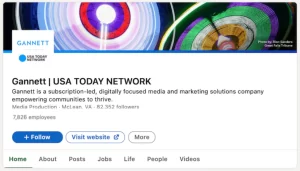
When you make the most of this feature, you not only increase customer satisfaction, but also build trust with your audience. Imagine that whenever a customer sends an unsolicited message, you have the opportunity to establish your company as an authority through professional, detailed answers, while demonstrating your concern and attention to their needs. This kind of interaction will make customers feel like they’re in direct contact with a brand that truly cares about their interests, rather than just being confronted with a cold corporate image.
Additionally, the messaging feature of your LinkedIn company page can be used to promote company updates and events. You can regularly push content about new product releases, corporate news or industry insights to your followers, so that they don’t just remain passive recipients of information, but form an ongoing interactive relationship. In this way, you can turn your company page into a “virtual parlour” that solves customer problems and conveys your brand’s philosophy, thereby increasing brand loyalty and market competitiveness.
Summery
By carefully crafting and managing your LinkedIn account, you can transform it into an efficient platform for client development and order production. Firstly, choosing the right avatar and perfecting your profile (including name, title, self-profile, work experience, etc.) not only creates a professional image, but also enhances customer trust. Second, ensure account information security through strict self-protection settings and screen appropriate friends to prevent competitor infiltration. Finally, by using LinkedIn’s messaging features (connection requests, private messages, InMail) and the interactive channels on your company page, you can promote your business, expand your business relationships, and continue to build your own ‘traffic pool’. In short, using these strategies systematically will not only bring you a steady stream of potential clients, but also build a personal brand with long-term value.