
















< Blogs

Shopify or WordPress: Which One is Better for Dropshipping?

Vivan Z.
Created on November 21, 2024 – Last updated on February 6, 20255 min read
Written by: Vivan Z.

Shopify vs WordPress

If you’re starting a dropshipping business, Shopify and WordPress are two popular platforms to choose from. Both have their strengths and weaknesses, but the right one depends on your skills, business needs, and future plans. Let me break it down in simple terms to help you decide.


Shopify: Easy and Perfect for Beginners

Shopify

Shopify is made for e-commerce, and it’s super simple to use. Don’t know coding? No problem! Shopify has tons of ready-to-use templates. It’s like building with Lego blocks—you just drag, drop, and create your store. It comes with built-in tools for payments, shipping, and managing orders. This saves you time and lets you focus on selling.

shopify template

Shopify also has a massive app store. You’ll find tools like Oberlo and Importify to quickly add products, Klaviyo and MailChimp for email marketing, and Privy or Upsell to boost sales. These apps make dropshipping smooth and stress-free.
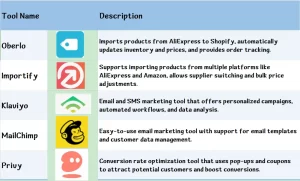
tools

But Shopify isn’t cheap. The basic plan starts at $29/month, and as your store grows, you might pay more, especially if you use third-party payment gateways. Also, if you want very specific designs or functions, Shopify can feel limiting.


WordPress: Flexible and Powerful, but Needs Tech Skills

Wordpress

WordPress, on the other hand, is a powerful option if you want more control. By adding the WooCommerce plugin, you can turn WordPress into a full e-commerce platform. The biggest advantage? Flexibility. You can design your store however you like and customize features such as payment methods or shipping options.
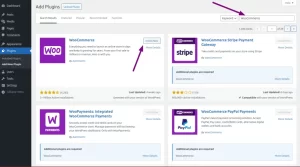
Woocommerce
Searching and showing the WooCommerce plugin via the Add Plugin WordPress screen.

WordPress is open-source, meaning there are endless plugins and resources available. It’s also cheaper—just pay for hosting and a domain, which costs less than Shopify’s monthly fees.

But here’s the catch: WordPress is not beginner-friendly. If you’re not tech-savvy, setting up plugins, payment systems, and optimizing your site can be overwhelming. And when things go wrong, there’s no centralized support. You’ll need to figure it out yourself or rely on online forums.


Who Should Choose Shopify?

Shopify is perfect if you’re new to e-commerce or want to start fast. It’s simple, has everything you need in one place, and their support team is always there to help. You can focus on selling without worrying about technical stuff.


Who Should Choose WordPress?

Go with WordPress if you know a bit about websites or don’t mind learning. It’s highly customizable and great for unique designs or features. Plus, it’s cheaper long-term. If you’re planning to scale and want full control, WordPress is a smart choice.


Which Platform Has Lower Long-Term Costs: Shopify or WordPress?
dropshipping

When comparing Shopify and WordPress, WordPress generally has lower long-term costs, especially if you manage your site efficiently. Here’s why:


WordPress: Lower Long-Term Costs

No Ongoing Subscription Fees
WordPress itself is free. You’ll only pay for hosting (starting around $5–$15/month), a domain (around $10–$20/year), and any plugins or themes you choose to add. Many plugins are free or have affordable one-time fees.

Customizable for Budget
WordPress allows you to scale costs based on your needs. If you’re on a budget, you can use free plugins and themes. As your business grows, you can invest in premium tools without paying a fixed monthly fee.

No Transaction Fees
WordPress doesn’t charge transaction fees unless you use certain payment gateways that have their own fees. You’ll save more as your revenue grows.


Shopify: Higher Costs Over Time

Monthly Subscription Fees
Shopify starts at $29/month and can go up to $299/month for advanced plans. These fees are unavoidable as long as you use the platform.

Transaction Fees
If you use a third-party payment gateway (like PayPal or Stripe), Shopify takes an additional transaction fee (0.5%–2%), which can add up as your sales increase.

App Costs
Many Shopify apps require monthly fees, and these can stack up quickly if you need multiple tools for your store.


Final Advice

If you’re a beginner, Shopify is the way to go—easy, quick, and hassle-free. If you’re more experienced or willing to learn, WordPress gives you more flexibility and control. Either way, pick the one that fits your needs, and take the first step toward building your dropshipping business. Success is waiting for you!

Buttom

DropSure is Your Best Partner
22 Years Experience
Affiliate Rebates
100% Quality Guarantee
Top-Up Rewards
10+ Global Warehouses
Custom Branding Support
Smart inventory System
24/7 Customer Support
Get a Quote in 24 Hours
Start Sourcing for Free

Keep Learning

Running successful Google Ads campaigns is not just about launching ads and increasing budgets. Even well-performing accounts can quietly develop hidden problems over time — wasted ad spend, declining conversion quality, tracking issues, keyword overlap, audience fatigue, or bidding inefficiencies that slowly reduce profitability. That’s why consistent account audits are critical. A proper monthly Google Ads audit helps advertisers identify weaknesses before they become expensive problems. Whether you manage campaigns for an e-commerce store, local business, SaaS company, B2B service provider, or marketing agency, regular account health checks can dramatically improve campaign efficiency and long-term performance. Many advertisers only react when results suddenly decline. But by the time performance drops become obvious, valuable budget may already have been wasted for weeks or months. This comprehensive guide explains the 7 most important monthly Google Ads account health checks every advertiser should perform, why each audit matters, common mistakes to watch for, and how to maintain healthier, more profitable campaigns over time. Why Monthly Google Ads Audits Matter Google Ads accounts are dynamic systems. Performance constantly changes because of: Competitor activity Seasonal trends Search behavior shifts Rising CPCs Audience fatigue Algorithm updates Conversion tracking problems Landing page changes Even highly optimized campaigns gradually drift away from peak efficiency if left unchecked. Monthly audits help advertisers: Reduce wasted spend Improve lead quality Increase conversion rates Catch technical problems early Improve Quality Scores Strengthen account structure Maintain stable scaling Most importantly, audits shift campaign management from reactive to proactive. What Makes a Healthy Google Ads Account? A healthy account is not simply one with high traffic or large budgets. Strong Google Ads accounts typically demonstrate: Reliable conversion tracking Clear campaign structure Controlled search targeting […]

In today’s digital marketing world, automation has become a double-edged sword. On one hand, Google Ads automation tools promise efficiency, smarter bidding, and better audience targeting. On the other hand, many marketers feel like they’re surrendering control to a “black box”—a system that makes decisions without transparent reasoning. For advertisers who value strategic insight and long-term growth, blindly relying on automation can be risky. So, how can you embrace the benefits of automation while keeping strategic control firmly in your hands? Let’s break it down. Understanding the Black Box Phenomenon The term “black box” refers to systems where inputs go in, outputs come out, but the internal decision-making process is opaque. Google’s automated campaigns, including Smart Bidding, Performance Max, and responsive search ads, fall into this category to varying degrees. These tools rely heavily on machine learning to optimize for conversion goals, often without explaining the “why” behind their choices. For marketers, this opacity presents three main challenges: Loss of Strategic InsightWhen automation decides which keywords to prioritize or which audiences to target, it’s difficult to connect those decisions to broader business strategy. Teams may see short-term performance gains but miss opportunities to shape brand positioning or long-term audience relationships. Limited Testing FlexibilityAutomated systems prioritize the paths that maximize immediate results. This can suppress experimentation with creative approaches, alternative messaging, or niche targeting, limiting innovation. Dependence on System DefaultsRelying on Google’s algorithms without intervention often leads to campaigns reflecting the system’s preferences rather than your unique business strategy. Understanding these risks is the first step toward reclaiming strategic control. Awareness allows you to design campaigns that leverage automation wisely without surrendering decision-making. Step 1: Define Clear Strategic Goals Before Automation […]

Introduction: Turning Social Media Traffic Into Real Customers Social media has changed the way brands connect with potential customers. Platforms like Instagram, Facebook, TikTok, Pinterest, and YouTube are no longer just places for entertainment and communication. They have become powerful shopping channels where consumers discover products, compare options, and make purchasing decisions. However, getting someone to click your social media post is only the beginning. Many online businesses invest significant time and money creating attractive ads, publishing engaging content, and building a strong social presence. They celebrate high click numbers but later discover that visitors leave without buying anything. The problem is often not the advertisement itself. The real issue is what happens after the click. A social media visitor arrives with a specific expectation. They clicked because something caught their attention: a product image, a discount offer, a creator recommendation, or a solution to a problem. If your landing page does not immediately continue that experience, visitors may lose interest and leave. A well-designed landing page acts as a bridge between social media attention and online sales. It guides visitors from curiosity to confidence, removes doubts, and encourages them to complete their purchase. This article explains how to optimize a social media landing page, improve the customer journey, and create a smoother path from a social media click to a completed order. 1. Understand the Difference Between Social Media Visitors and Regular Website Visitors Before improving your landing page, it is important to understand where your visitors come from. Someone who arrives through a search engine usually has a clear intention. They may already know what they want and are actively looking for a solution. Social media visitors behave […]

Recommended for you